Also known as an auto dialler, an outbound dialler automates the process of making calls to customers and contacts and routes the answered calls to your available agents.
Manual vs auto dialling
Dialling can be done manually on a mobile or business phone, with an agent placing calls one after another from a list. Many contact centres use automated dialling for high-volume outbound campaigns, as agents spend less time dialling and waiting for calls to be answered and more time having conversations.
If you’re considering incorporating dialler technology into your contact strategy here are the dialler features you should look out for when choosing a provider.
7 outbound dialler features to look for
1. Multiple dialling modes available
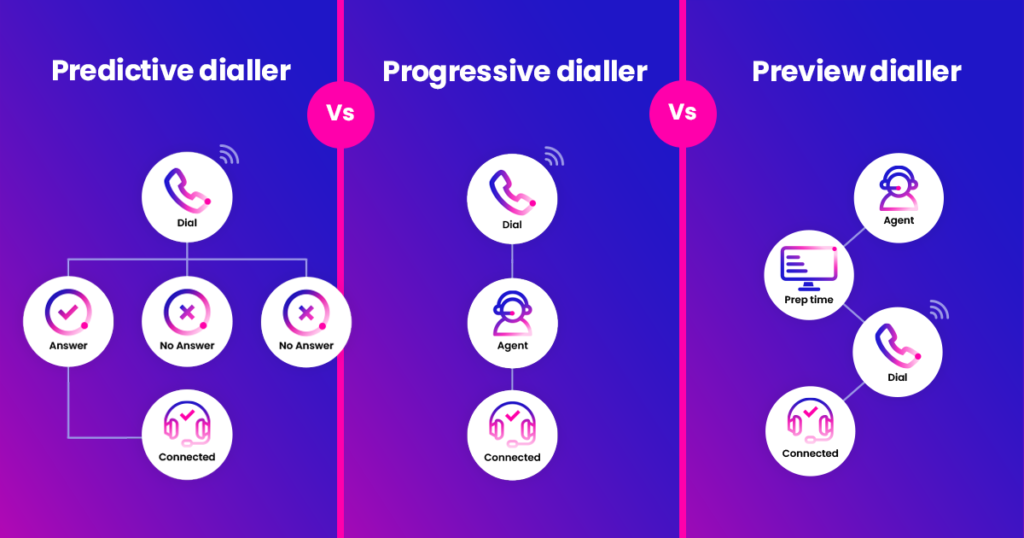
Most auto-diallers have three dialling modes that teams switch between depending on the type of outbound campaign you are doing. These modes are predictive, progressive and preview.
Predictive dialling
Predictive dialling places calls ahead of agents becoming free based on the software’s predictions of agent availability. It dials multiple numbers simultaneously, so that when agents finish one call, they can be instantly connected to the next to maximise talk-time. It suits high-volume campaigns with experienced teams and mature contact lists.
Progressive dialling
Progressive diallers have a slower pace, only dialling a number when an agent is ready and available to take the call. Dialling is instant and automatic, so call volumes stay relatively high, but it is best suited to regulated campaigns and collections, where consistency matters more than volume.
Preview dialling
A preview dialler shows the agent the contact record first, and after a short preview period dials automatically. This delay lets the agent prepare for the call, using information typically taken from the company CRM system, which is often integrated into the dialler. Preview dialling mode suits high-value or complex calls where context changes the outcome.
For more detail on different dialling modes, read our predictive, progressive and preview dialler modes guide.
2. Answer Machine Detection (AMD)
Answer machine detection (AMD) identifies voicemails and answering machines before they reach an agent. This means agents only spend time on live conversations, saving them valuable time and boosting productivity.
If the system can't confidently tell within a couple of seconds whether a call is live, it passes the call to the agent, so real conversations aren't lost to false positives. MaxContact's dialler gives up to 40% less time lost to voicemails and no-answers.
3. Built in compliance controls
Automated outbound dialling is an area that’s closely regulated in the UK, with silent and abandoned calls often a talking point due to the fines and reputational damage if they are handled wrong.
When you’re comparing dialler platforms, look for controls that are built in rather than bolted on, so compliance doesn't depend on someone remembering to configure it.
Here are some key controls to look out for:
- Pacing that aims for zero abandoned calls. A call is abandoned when a customer answers and no agent is free. Ofcom's target is 0%, not the old 3% figure some diallers are still set to.
- 72-hour rule handling. A number that received an abandoned call should only be recalled within 72 hours if an agent is guaranteed, for example by switching it to preview mode.
- Minimum ring time, in line with Ofcom's 15-second guidance.
- Valid CLI on every call. See our guide to CLI compliance.
- Do Not Call and TPS screening, so registered numbers are removed automatically.
- Calling windows, configurable for each campaign.
- Audit trails, with call recording and data capture, so you can evidence compliance if Ofcom or the FCA ask.
For more on how the rules work in practice, see our guide to Ofcom and PECR regulations.
4. Number recycling and retries
Many calls go unanswered the first time, so a good dialler doesn't just move on, as that means lost leads. Instead, it puts unanswered numbers back in the queue to be retried, so more leads are reached, and it keeps how often each contact is called within official limits, so they're never pestered. Look for control over how many attempts each number gets and how long the dialler waits between them, so you can retry at different times without overdoing it. It should also handle customers who ask to be called back later, so those conversations aren't lost.
5. CRM integration
A powerful dialler is even better when it works hand in hand with your existing systems. It gives an agent access to customer history, preferred contact methods, and past feedback – all within the dialler interface.
This allows for personalised conversations that address specific needs, leading to happier customers and improved call outcomes. Easy integration applies to after-sales and debt resolution teams too.
By connecting your dialler with other systems, you can put all relevant information at agents’ fingertips, reducing the time spent searching for information. MaxContact connects with Salesforce, HubSpot, Zoho and AutoConvert, with open APIs for other systems.
6. Outbound skill-based routing
Skill-based routing isn't only for inbound calls. Outbound skill-based routing matches each lead to the agent best placed to handle it, based on skills and proficiency, and it works in preview, progressive and predictive modes. It stops high-value or sensitive leads reaching an agent who isn't equipped for the conversation. Read how outbound skill-based routing works.
7. Reporting and dashboards
You can only improve contact centre performance when you can measure it. Look for reporting and analytics dashboards that give you complete visibility around call metrics and agent performance, as well as scheduled reports so you can set targets and track them across campaigns, teams, and agents.
Choosing an outbound dialler
Use this list as a checklist when comparing providers, whether you're running sales, debt collection or customer service campaigns. To see how MaxContact's dialler handles these features, explore our outbound dialler software or book a demo.





.png)
