Resource Centres are powerful, contextual hubs that surface relevant help content based on the product you’re working in. Whether you’re looking for a quick answer, learning a new feature, or working through a process step-by-step, support is now available exactly where you need it.
Why we built this
When you’re in the middle of a task, the last thing you want to is to stop, switch tools, or wait for a support response just to keep moving forward.
Resource Centres have been built to help you:
- Resolve questions quickly
- Stay focused on the task at hand
- Reduce disruption to your workflow
Instead of raising a support ticket or searching through documentation elsewhere, you can now access answers and guidance directly in the product. Helping you move faster and with greater confidence.
By bringing guides and walkthroughs into MaxContact itself, we can show you the exact steps to take, in real time, removing uncertainty and reducing the chance of error. This is especially valuable when new features are released, allowing you to build an immediate understanding of how they work and how you might want use them in your own setup.
What’s New: Key Features at a Glance
Within the Resource Centres you’ll find:
- Powerful Knowledge Base Search
- Step-by-Step Guided Tours
- AI-Powered Chat Assistant
- Contextual Help, tailored to the product you’re working in
This is just the beginning. Resource Centres will continue to evolve, with additional features and capabilities planned over time.
Feature Breakdown: How Resource Centres Help You!
In-Product Access
Resource Centres are available directly within the MaxContact product, meaning help is always close at hand.
Powerful Knowledge Base Search
If you’re looking for more information on a particular setting, page or feature, you can now search our Knowledge Base directly from within the product. You’ll be taken straight to the most relevant solutions article, significantly reducing the time it takes to find the right answer.
We’re continually improving our Knowledge Base content to ensure articles remain accurate, clear and genuinely useful.
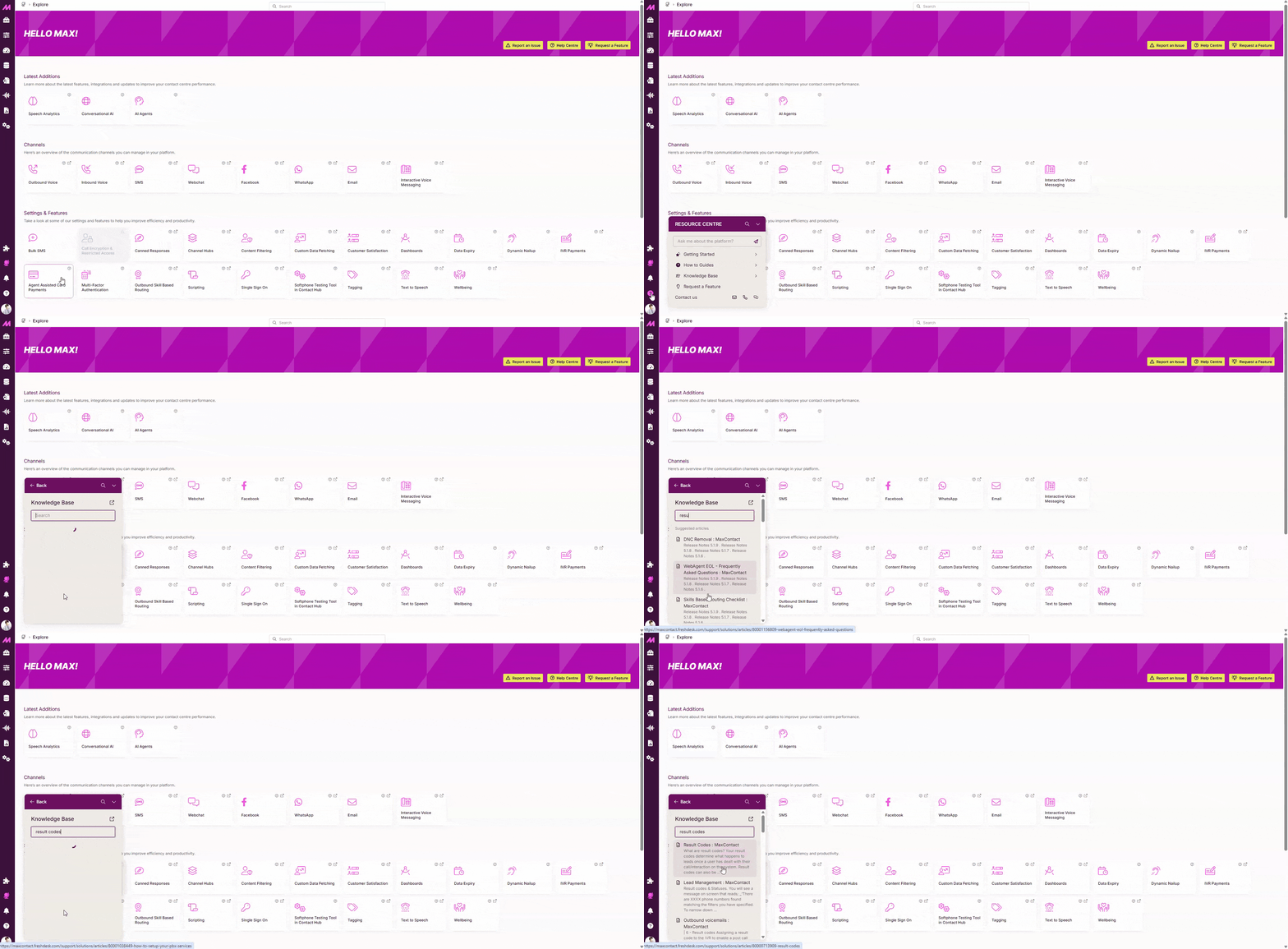
Step-by-Step Guided Tours
Guided Tours walk you through key processes directly within the product, step-by-step. They guide you to exact areas you need, highlight the relevant settings, and explain what each step is used for, so nothing is missed.
These tours are designed to:
- Help you complete tasks confidently
- Reduce confusion around complex processes
- Demonstrate new features as soon as they’re released
This means you can learn and adopt new functionality immediately, without having to search through release notes or documentation.
We’ve also reviewed common support desk queries to ensure the guides we build focus on what matters most to our customers. From everyday tasks to frequently requested processes, like blocking an inbound caller, making them quick and straightforward to complete.
.gif)
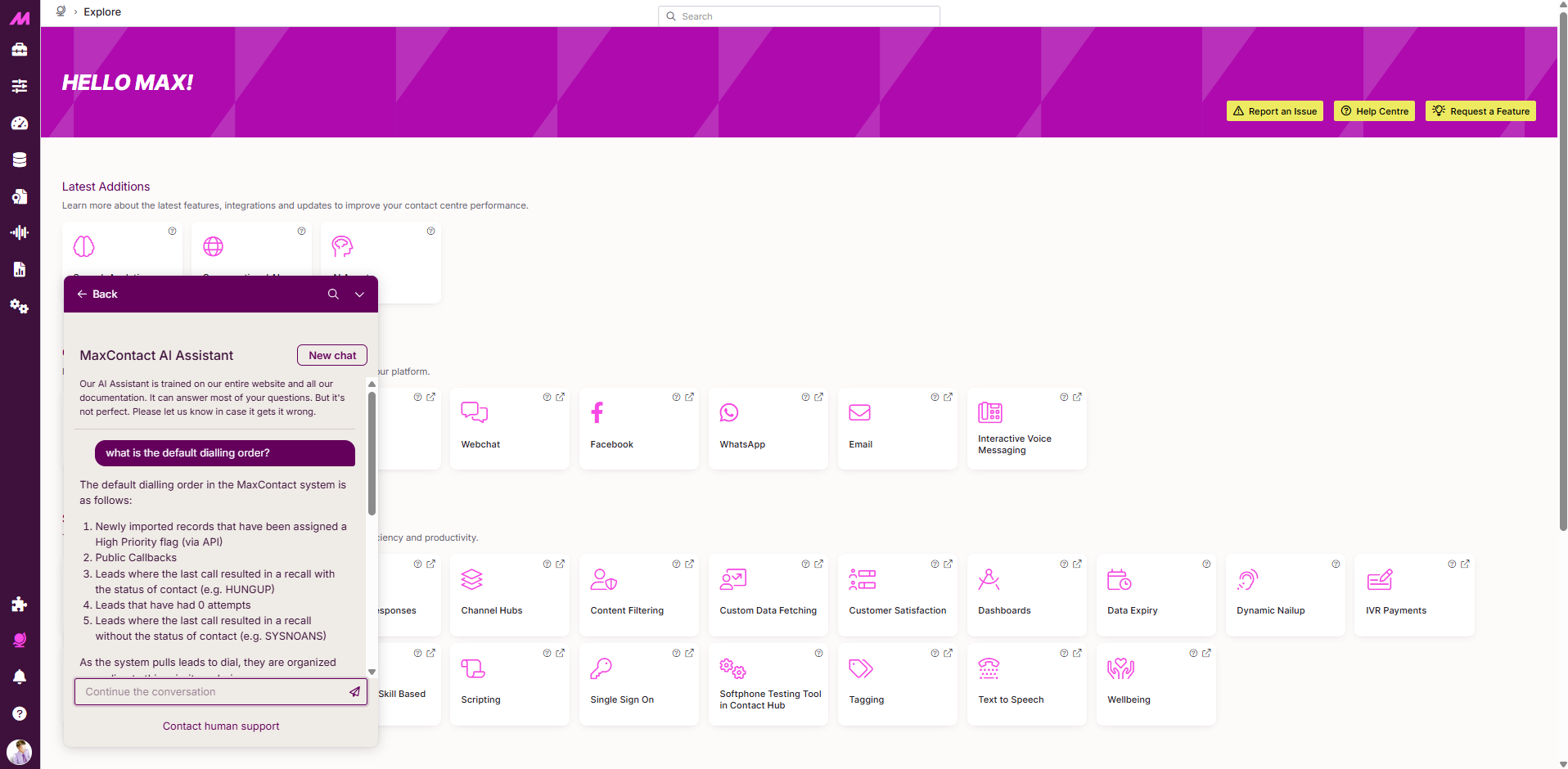
AI-Powered Chat Assistant
The AI chat assistant is trained on our latest solution articles and product information, so you can feel confident in the answers it provides.
Alongside each response, you’ll also be shown the articles and guides that informed the answer, allowing you to explore further and build deeper knowledge when needed.
Contextual Help, Tailored to Each Product
Each Resource Centre is built specifically for the product it sits within.
For example:
- In Management Hub, you’ll see content and guides relevant to configuration and administration
- In Conversation Analytics, help is tailored specifically to analytics features
- In Contact Hub, users can self-train through guided walkthroughs directly in the product
What This Means for Support Going Forward
Our Support team isn’t going anywhere.
Resource Centres are designed to complement human support, not replace it. By enabling faster self-service for common questions and tasks, our Support team can focus more time on complex, high-priority issues, helping deliver meaningful resolutions when you need them most.
We’re excited to launch Resource Centres and look forward to seeing how they help make your day-to-day work simpler and more efficient.
Resource Centres will be gradually rolled out over the coming weeks, launching in Management Hub and Contact Hub, with Conversation Analytics to follow.
.png)
