featured
article
Fresh thinking and practical takeaways to help your business improve customer engagement and unlock better performance.

discover THE
latest articles
Workload squeeze: 52.6% of contact centres report rising agent workload as turnover remains high at 31.2%
New research finds contact centre agent workload pressure is accelerating as AI investment becomes a top priority.
The workload squeeze on UK contact centres is intensifying. In the latest 2025/6 UK Contact Centre KPI Benchmarking Insights Report, 52.6% of respondents report increased agent workload, up from 42% in 2024, a 10% rise. The report also highlights the people impact of sustained pressure: average annual agent turnover is 31.2%, up from 30.2% last year.
The report, based on a survey of 300 UK contact centre decision makers, highlights a sector balancing high customer expectations with tough economic conditions, and increasingly looking to technology to relieve pressure.
“Customer facing teams are being asked to do more - and the data shows that pressure is rising year-on-year,” said Ben Booth, CEO, MaxContact. “When workload increases, it doesn’t just affect service levels. It affects quality, morale, and the capacity to improve. The most sustainable response is to reclaim time - removing avoidable work and using AI to handle routine interactions and provide team’s with support, so they can focus on the conversations that truly need a human.”
AI moves from experiment to strategy
The research suggests AI is quickly becoming central to contact centre operations and investment. 66% of respondents say their organisations are using or piloting AI, with a further 20% planning implementation in 2025/26.
Looking ahead, 60% of respondents say AI and automation tools will be a main area of increased investment in 2026, while 55% cite AI and automation implementation as a top technology priority for 2025/26.
Among those already using or piloting AI, the report finds:
- 48% say AI has improved customer experience
- 30% say AI has driven a significant transformation, with AI becoming central to service delivery
- 99% are confident AI will improve contact centre effectiveness over the next three years
“This isn’t AI for AI’s sake,” added Booth. “Businesses are clear on the goal: protect customer experience or drive the desired business outcomes while reclaiming capacity for teams. The winners will be those who build AI into day-to-day service - not just a bolt-on tool.”
.png)
Competitive advantage is shifting towards technology, speed and insight
When asked what delivers the most competitive advantage, respondents point to:
- Advanced technology/automation (42%)
- Speed and responsiveness (42%)
- Better customer data and insights (38%)
At the same time, the report highlights constraints contact centres must navigate as they scale AI. 45% cite data security concerns as a leading challenge holding back AI ambitions.
Reclaiming time in the contact centre
In response to the findings, MaxContact is urging leaders to focus AI investment on one tangible outcome, reclaiming time.
That means:
- Shifting high-volume, repetitive interactions to self-serve and automation to reduce operational pressure
- Using insight from conversations to spot objections, knowledge gaps and coaching opportunities - so you improve performance faster, across sales and service
- Supporting agents with better context and guidance so human time goes to high-value, high-impact conversations
The full findings and benchmarks are available in the 2025/6 UK Contact Centre KPI Benchmarking Insights Report.

What 800,000 Sales Calls Taught Us About Handling Objections
It’s easy to view objections as a rejection, but they should be viewed as opportunities. Objection handling is a chance to address concerns, show value, and build stronger customer relationships.
Every salesperson has heard them before:
❌ “How did you get my number?”
❌ “No, I’m not interested.”
❌ “I’m already with [competitor].”
Everyone who works in the industry knows that sales objections are inevitable. Particularly if you work in a high-pressure environment like a call centre where agents handle hundreds of calls every day.
It’s easy to view objections as a rejection, but a recent analysis of 800,000+ objections calls carried out by MaxContact from annoymynised platform data revealed that 39% can be overturned if they are handled well.
Objections should be viewed as opportunities. The chance to address concerns, show value, build stronger customer relationships, and move prospects closer to saying yes.
“When I first started in sales, the biggest challenge wasn’t hearing objections, it was knowing how to respond instead of just saying ‘Oh right, OK’ and ending the call.” – Business Development Manager, MaxContact
However, mastering objection handling doesn’t come down to persistence alone; it’s about having the right tools, techniques, and insights to guide conversations, understand prospect needs, and ultimately, improve conversions.
In this article, we’ll explore:
- Proven objection-handling techniques that empower sales teams.
- How AI-driven insights from MaxContact’s Conversation Analytics platform (including our success intelligence feature) can improve objection-handling strategies.
It builds confidence within your sales team
When salespeople feel equipped to handle objections, they perform better. Our data shows that some objections are highly recoverable, for example:
- 46% of “No Immediate Need” objections were overturned
- 46% of “Lack of Time” objections were also successfully handled
This proves that when a sales team adopts the mentality that objections are hesitations, and signal the end of a conversation, they are more likely to find ways to adapt and refine their sales approach, instead of cutting their losses
It improves conversion rates
Many objections aren’t a firm no; instead, they’re usually a sign that the prospect is missing key information and needs more clarity.
Our data analysis revealed that while “Not Interested” is one of the most common objections, occurring over 150,000 times. It’s also one of the hardest to overcome, with a 23% success rate.
Agents need to listen to and address these objections by being armed with a deep understanding of the right information to turn conversations around.
It strengthens team performance
The most successful sales teams share best practices rather than keep them to themselves. They learn from each other’s handling techniques and replicate the best strategies across the team.
With MaxContact’s Success Intelligence feature, which is part of our Conversation Analytics product, sales leaders can identify patterns in objections. Leaders can see:
- Which objections appear most frequently
- Which ones agents struggle with
- Which top performers consistently overturn
- Coaching opportunities based on data, not assumptions
For example, cost-related objections account for 18% of all objections, but teams overturn almost 40% of them when they use strong value framing.
It creates better customer experiences
Even if a sale doesn’t happen immediately (the majority don’t), a well-handled objection and respectful interaction builds trust, increasing the likelihood of a conversion further down the line.
Trust-based objections (which account for 22% of all objections) are among the hardest to overcome, especially “Lack of Trust,” which has just a 32% success rate.
A professional and respectful interaction can leave a positive impression, which means when things change in the future, they are more likely to consider you and get back in touch
Objection handling techniques for sales calls
1. Be prepared with a decent script
Why? A structured script helps your sales team be consistent and shows agents what good looks like. It is also easier to refine your approach and build agent confidence when handling objections.
Top Tip: You should regularly review and update your call scripts to mirror common objections. Refinements should be based on real-world responses and positive past outcomes.
Want ready-to-use objection-handling scripts? Download our Scripting Templates for Dealing with Difficult Customers to train your team with proven responses.
2. Anticipate and address objections before the call
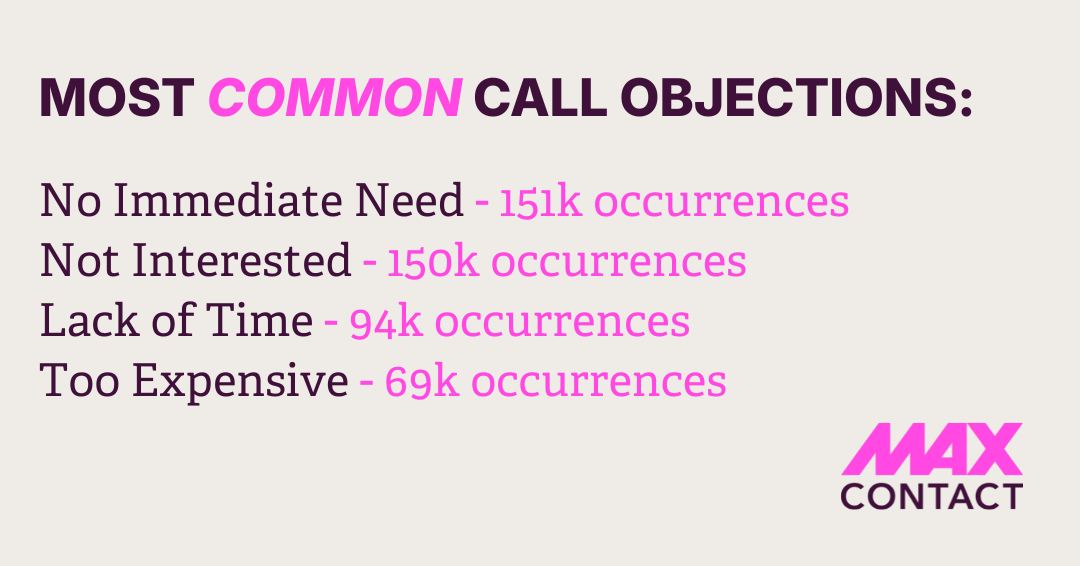
Proactively addressing potential concerns reduces resistance later in the conversation. Our dataset shows the most common objections are:
- No Immediate Need - 151k occurrences
- Not Interested - 150k occurrences
- Lack of Time - 94k occurrences
- Too Expensive - 69k occurrences
Top Tip: Do your research before the call and think about what their objections are likely to be. If you proactively address these pain points early in your pitch, you prevent them from derailing conversations later.
3. Focus on building value
Cost objections make up nearly 70,000 conversations, but almost 45% of “Disputes Amount” objections are overturned when agents clearly demonstrate value. If you can confidently demonstrate how your product or service meets your prospect’s unique needs, it paves the way for a conversation with fewer objections to overcome.
Top Tip: Tailor your sales pitch so it addresses their specific pain points and priorities to make the benefits more relevant and persuasive.
4. Uncover the real concerns behind the objection
Surface-level objections can often mask deeper customer concerns.
“Scepticism,” for example, occurred 50,364 times, with agents successfully resolving 44% when they probed deeper into customer concerns.
Listening, probing and clarifying explore the real motivations behind a “no.”
Top Tip: Use probing questions to encourage the customer to open up and really listen to what they have to say:
“What are your biggest challenges with your current system?”
“What keeps you up at night about this issue?”
“What does a good day vs. a bad day look like?”
Sales Specialist Insight: “Ask and then be quiet and listen. If you can keep the conversation going, you’ll build rapport, understand their needs, and have a better chance of addressing their true concerns.”
5. Know when to cut your losses
It’s a skill in itself to realise that not every prospect is worth pursuing. At the end of the day, your time is a valuable resource, and some objections are genuine dead-ends, contractual commitments being one.
Our data analysis uncovered that “Contractual Obligations” appears less often as an objection but has a low recovery rate of just 35%.
Top Tip: Learn to recognise the signs that an objection is a hard “no” rather than a request for reassurance. Feel comfortable to politely bring the conversation to a close when it’s necessary.
Example: What does a ‘hard no’ sound like?
Agent: “I think our solution can really help you with [pain point]. Are you free for a quick call next week?”
Prospect: “Well, we’ve actually just signed a five-year contract with another provider, so we’re locked in with them.”
Agent: "Oh ok, sounds like you’re set for now, but I’d like to stay in touch in case your needs change in the future. Would you be happy for me to check back in with you in a few months to see how everything is going?"
Instead of pushing further, the agent sees that this isn’t a timing objection; it’s a contractual commitment. Instead they:
- Respect the prospect’s situation and don’t waste time.
- Keep the door open for future conversations.
- Avoid the hard-sell approach, which could damage the relationship.
6. Understand it’s a numbers game
Why? Not every call ends with a sale, but persistence and efficiency are part of what drives success.
How? It’s important that sales agents don’t get hung up on rejections. Call volume and quality interactions are key, so the best thing to do is move on to the next prospect.
Top Tip: Use automated dialler software to improve connection rates and reduce wasted time. Skills-based call routing can also help to match the right agents to potential opportunities to match their knowledge and experience.
Objection handling cheat sheet
| Common objection | Objection-handling strategy |
|---|---|
| “It’s just too expensive for us.” | Uncover true concern → “Is it just price, or is there another factor holding you back?” |
| “I’m already working with a competitor.” | Value-based approach → “That makes sense! What do you like about them, and where do you see room for improvement?” |
| “I don’t have time to talk right now.” | Interest-based hook → “I completely understand. If I could show you a way to [solve X pain point], would it be worth a quick follow-up?” |
How AI-driven insights take objection handling to the next level
Not every call ends with a sale, but persistence and efficiency are part of what drives success. Across all 803,000 objections, agents overcame 39% overall.
It’s important that sales agents don’t get hung up on rejections. Call volume and quality interactions are key, so the best thing to do is move on to the next prospect.
Top Tip: Use automated dialler software to improve connection rates and reduce wasted time. Skills-based call routing can also help to match the right agents to potential opportunities using their relevant knowledge and experience.
MaxContact’s Conversation Analytics & Success Intelligence - Turning Insights into Sales Success
Traditionally, sales coaching relies on manual call reviews, which are time-consuming and only capture a small percentage of conversations.
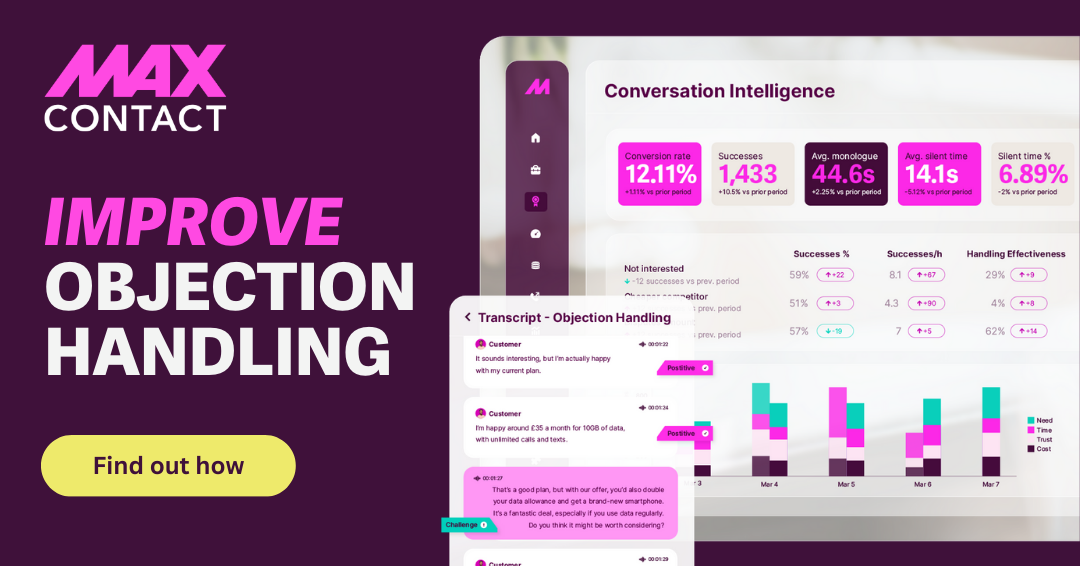
But with Conversation Analytics and Success Intelligence, sales teams can now use post-call insights and AI-powered analytics to enhance objection handling across teams.
Here’s how it is used in call centres.
Speech analytics that goes beyond transcription
- Transcribe and analyse 100% of calls with speech analytics. Instead of analysing small call samples taken at random, you can search and analyse a higher volume of calls, so fewer objections go unnoticed.
- Identify trends in objections and understand the most common customer concerns within your sales process.
- Track sentiment and review call summaries to explore where or when conversations take a negative turn.
- Use AI-powered analytics to enhance coaching with data-backed insights that help agents improve faster.
Success Intelligence - AI that measures & improves objection handling
- Categorise and analyse objections and help agents refine their approach.
- Identify what top performers do differently to overcome objections and use it as a blueprint for coaching agents who struggle.
- Provide actionable insights based on performance trends and data, not just opinions based on limited call samples.
“Success Intelligence highlights your best-performing agents and allows you to compare them with lesser-performing agents to see where improvements can be made. Instead of just reviewing a handful of calls, we now have insights into every objection raised and whether or not it was handled effectively.”
Ready to handle objections in sales the smarter way?
Handling objections is more than just a desirable sales skill; it’s a competitive advantage.
The best sales teams:
✔ Use structured scripts and refined techniques.
✔ Stay adaptive and customer-focused.
✔ Use AI-driven insights to continuously improve strategies.
Want to see these techniques in action?
Book a free demo of MaxContact’s Conversation Analytics to see how AI-powered insights can improve your sales team’s objection handling

Contact Centre Trends: What to Expect in 2026
2025 taught us that small AI wins beat big promises. Now 2026 presents a different challenge.
Contact centres are working harder than ever – yet outcomes aren't improving. Despite deploying more technology and increased investment, connect rates remain stubbornly lower, attrition stays high and costs per call have reached a five-year high.
The breakthrough will come from technology that connects seamlessly – where your systems work as one platform, not separate tools.
Here's what contact centre leaders need to know about 2026.
2026's Defining Shift: Making Your Systems Talk to Each Other
Last year was about proving AI works. This year is about making it work together.
Picture this: Your conversation analytics spots that agents are struggling with a specific complaint type. Right now, that insight sits in a report somewhere. In 2026? It automatically triggers updated coaching materials, alerts team leaders, and feeds into next week's training schedule.
That's the shift. Not more tools. Connected tools.
Your CRM knows what your telephony system is doing. Your analytics feed your workforce planning. Your AI capabilities trigger actual actions, not just insights.
The winners in 2026 will connect their systems, not just collect them.
- Key Takeaway: The winners in 2026 will be organisations that connect their capabilities, not just collect point solutions.
AI Adoption: Data First or Fail Fast
With 66% of organisations already using or piloting AI, adoption is no longer the question. Successful implementation is. And here's the problem: 80% cite data quality as their main barrier, while 75% say their data is too siloed to use AI effectively.
Here's what happens next
Some organisations will fix their data first. Others will skip that step and wonder why their AI projects fail. The gap between these two groups will widen fast in 2026.
The organisations getting it right start with a simple question:
Before any AI project: where's the data? Is it current? Can we trust it? Is it joined up?
Then they split projects into two categories:
- Quick wins need minimal data. Automated absence handling? One data source. Call summarisation? Just transcripts. These deliver fast returns and fund bigger projects.
- Big projects need more serious data work. Cross-channel customer insights. Predictive analytics. These require 12-18 months of data consolidation. But once done, they unlock multiple AI use cases at once.
The Reality Check
Most organisations skip the data work. They deploy AI on fragmented information. It disappoints. They blame the AI.
Meanwhile, AI is creating more data. Speech analytics now transcribes every call. Conversation analytics tracks every interaction. The challenge isn't just fixing old data problems – it's making the flood of new data useful for the people who need it.
- Key Takeaway: Start with quick wins on clean data. But commit to the harder work of data consolidation, or your AI projects will keep disappointing.
Contact Strategy: Beyond Set-and-Forget
The numbers are stark: outbound connect rates sit at 42.8%, with only 27% reaching the right person. Traditional set-and-forget strategies aren't working. AI call screening will only make this harder.
Yet voice isn't dying – it's evolving. Most valuable AI starts with voice: conversational AI, sentiment analysis, real-time insights. Even chatbots are moving toward voice interfaces.
What Works in 2026
Three factors define successful contact strategies:
- Speed to lead has returned as top priority. When customers show intent, the window is minutes, not hours. Organisations reaching out within 5-10 minutes see dramatically higher conversion.
- Intelligent personalisation means dynamic, context-aware outreach. Not just who to contact, but when, how, and with what message based on their specific situation and recent interactions. This requires joining up web behaviour, contact history, and purchase patterns.
- Dynamic multi-channel workflows adapt in real-time. Customer doesn't answer? Trigger an SMS: "We're calling from [company]. Save this number, we'll call back at [preferred time]." They respond with availability and the system adapts. They engage via chat? The system handles it and transfers to human when needed, with full context.
Why SMS Matters
SMS isn't replacing calls. It's making calls work better.
"Save our number, we'll call when suits you" transforms cold calling into expected contact. Response rates go up. Conversations are better because people are ready for them.
But only if your SMS, voice, chat, and email systems actually work together.
- Key Takeaway: Abandon set-and-forget for dynamic, multi-channel workflows that adapt to customer behaviour. Build multi-channel workflows that adapt to how each customer actually wants to engage.
The Data Problem: From Integration to Intelligence
Contact centres are saying siloed data blocks CX improvement. Teams make decisions on incomplete information. Despite AI tools generating insights, frontline managers still can't easily answer: "Which agents are struggling and why?" or "Where are our quality issues?"
Will 2026 fix this? Our prediction: fragmentation won't worsen, but solving it will be slower than hoped. The challenge has shifted from having data to making it meaningful.
The New Challenge
Conversational analytics now transcribes every call and summarises every interaction. That's incredibly valuable.
But a team leader managing 15 agents faces 500 call summaries a day. Reading them all isn't realistic.
What they actually need: which agents need support right now? What's the trending issue today? What should I focus on first?
What This Looks Like When It Works
It's 9:30am Tuesday. Your team leader opens their screen and sees:
"Agent Sarah has handled three difficult complaints this morning. Might need a check-in."
"Billing issue contacts up 40% vs yesterday. Consider adding afternoon resource."
Not a dashboard to interpret. Not a report to analyse. Just: here's what needs your attention right now.
How to Get There
The organisations making progress aren't building more sophisticated dashboards. They're rethinking how information reaches people.
- Alerts instead of reports. Team leaders get notified when agents need support. Ops managers see capacity issues before they escalate. The system brings insights to people, rather than expecting people to hunt for them.
- Conversational access. A team leader can ask: "Why is Sarah's handle time up today?" and get an answer with context. No report building required.
- Embedded in workflows. Insights appear where people already work, not in separate reporting tools they need to remember to check.
Key Takeaway: The challenge isn't gathering data or even analysing it. It's getting the right insight to the right person at the moment they can act on it.
Agent Experience: Finally a Priority
The statistics: 52% report increased workload (up 10 points), agents switch between 6-12 windows, attrition remains at 31.2%, and cost per call hits £6.26. As routine tasks automate, agents handle only complex interactions – meaning every contact is difficult.
Why This Matters Now
The business case is finally clear. At £6.26 per call, you can't afford agents spending 30% of their time hunting for information across multiple systems.
Vendors are starting to focus on this. The quick AI wins – digital deflection, call summarisation – are done. Now they're tackling the harder problem: reducing the cognitive load that comes from constantly switching context.
What’s Changing in 2026
As low-value tasks automate, agents handle only high-value interactions. Every conversation involves complexity or emotional sensitivity. The job is harder than ever.
In 2026, expect:
- Unified desktops that bring information from multiple systems into single interfaces, surfacing the right information at the right time based on conversation context.
- Real-time assistance that provides contextual guidance, suggests actions, surfaces knowledge articles, and drafts responses. AI becomes the agent's assistant, not replacement.
- Post-interaction support recognising the emotional toll. Automated break scheduling after difficult calls, sentiment monitoring for struggling agents, proactive manager interventions.
- Better performance frameworks moving beyond handle time to recognise interaction complexity. First-call resolution for complex issues, sentiment improvement, and de-escalation become the measures that matter.
Will 2026 fix the agent experience? Our prediction: improvements begin, but full transformation extends into 2027.
Key Takeaway: Agent experience is finally getting serious attention. The focus is shifting to reducing cognitive load and supporting agents who now handle only the most complex interactions.
The Offshore Reality
Offshoring is accelerating. The economic pressure from 2025 isn't easing – it's getting stronger.
But there's a pattern worth noting. Over the past 15+ years, we've seen the same cycle repeat: contact centres move offshore to cut costs. Quality issues emerge. Operations move back to the UK. Then costs rise again, and the cycle starts over.
Offshoring isn't a permanent solution. It's a response to immediate pressure that often creates different problems down the line.
What this means for UK operations
If you're running a UK contact centre, competing on cost alone won't work. The economics don't add up.
The path forward? Combine AI efficiency with the advantages UK operations naturally have. Quality. Cultural alignment. Regulatory compliance. Understanding of the local market.
AI helps narrow the cost gap. 20-30% efficiency improvements make the economics more defensible. You're still not the cheapest option, but you can justify the premium based on outcomes.
Here's the reality: without AI, UK contact centres at scale struggle to make the numbers work. With AI, you can compete on value rather than just price.
- Key Takeaway: For UK operations, AI isn't a nice-to-have. It's what enables you to compete on outcomes while narrowing the cost gap that offshore alternatives exploit.
Looking Ahead: Strategic Technology Decisions
As we move through 2026, the question isn't whether to invest in technology. It's which technology to invest in.
- Choose solutions that connect with what you already have. The best new tool in the world doesn't help if it sits in isolation. Before buying anything, ask: how does this integrate with our existing systems? Can it talk to our CRM? Our telephony platform? Our analytics tools?
- Prioritise data foundations. Fix the plumbing before adding new taps. If your data is fragmented, every AI tool you add will underperform. Sometimes the smartest investment is consolidating what you have, not buying something new.
- Look for vendors who care about outcomes, not just features. The conversation should be about what you're trying to achieve, not just what the software can do. Implementation support. Integration help. Ongoing optimisation. That matters more than a long feature list.
The bigger picture
The challenges facing contact centres in 2026 are real. Rising costs. High attrition. Fragmented data. Low connect rates.
But here's the opportunity: the right technology decisions – made thoughtfully – can genuinely transform outcomes. Not through revolutionary breakthroughs. Through building an ecosystem where your systems work together. Where new capabilities enhance what you already have. Where data flows naturally between tools, creating workflows that deliver results.
That's what 2026 is really about. Moving from collecting disconnected tools to building platforms that work as one.
What Contact Centres Should Prioritise in 2026
- Strategic technology decisions that prioritise full deployment and optimisation of existing AI capabilities alongside thoughtful expansion of your technology stack.
- Clear ROI demonstration for every new investment, with realistic timelines and measurable outcomes.
- First-contact resolution as a cost-reduction strategy, using AI and better agent support to solve issues completely on first interaction.
- Strategic workforce planning optimising resource allocation through AI-powered forecasting and scheduling.
- Data foundations that enable AI success – investing in consolidation and integration before deploying new capabilities.
- Agent experience improvements focusing on reducing cognitive load through unified interfaces and real-time assistance.
- Integrated workflows connecting systems across your technology stack so capabilities work together, not in isolation.
The contact centre industry has shown remarkable resilience. As we enter 2026, the organisations that thrive will be those that combine innovative technology with strategic implementation – building integrated systems that deliver measurable outcomes.
Ready to build a more integrated contact centre for 2026? Book a demo to see how MaxContact’s integrated platforms can address your challenges.

Introducing Resource Centres: In-Product Help, Exactly When You Need It!
In the latest release of MaxContact, we’re excited to introduce Resource Centres – a brand new in-product feature designed to help you get answers, guidance and support without ever leaving MaxContact.
Resource Centres are powerful, contextual hubs that surface relevant help content based on the product you’re working in. Whether you’re looking for a quick answer, learning a new feature, or working through a process step-by-step, support is now available exactly where you need it.
Why we built this
When you’re in the middle of a task, the last thing you want to is to stop, switch tools, or wait for a support response just to keep moving forward.
Resource Centres have been built to help you:
- Resolve questions quickly
- Stay focused on the task at hand
- Reduce disruption to your workflow
Instead of raising a support ticket or searching through documentation elsewhere, you can now access answers and guidance directly in the product. Helping you move faster and with greater confidence.
By bringing guides and walkthroughs into MaxContact itself, we can show you the exact steps to take, in real time, removing uncertainty and reducing the chance of error. This is especially valuable when new features are released, allowing you to build an immediate understanding of how they work and how you might want use them in your own setup.
What’s New: Key Features at a Glance
Within the Resource Centres you’ll find:
- Powerful Knowledge Base Search
- Step-by-Step Guided Tours
- AI-Powered Chat Assistant
- Contextual Help, tailored to the product you’re working in
This is just the beginning. Resource Centres will continue to evolve, with additional features and capabilities planned over time.
Feature Breakdown: How Resource Centres Help You!
In-Product Access
Resource Centres are available directly within the MaxContact product, meaning help is always close at hand.
Powerful Knowledge Base Search
If you’re looking for more information on a particular setting, page or feature, you can now search our Knowledge Base directly from within the product. You’ll be taken straight to the most relevant solutions article, significantly reducing the time it takes to find the right answer.
We’re continually improving our Knowledge Base content to ensure articles remain accurate, clear and genuinely useful.
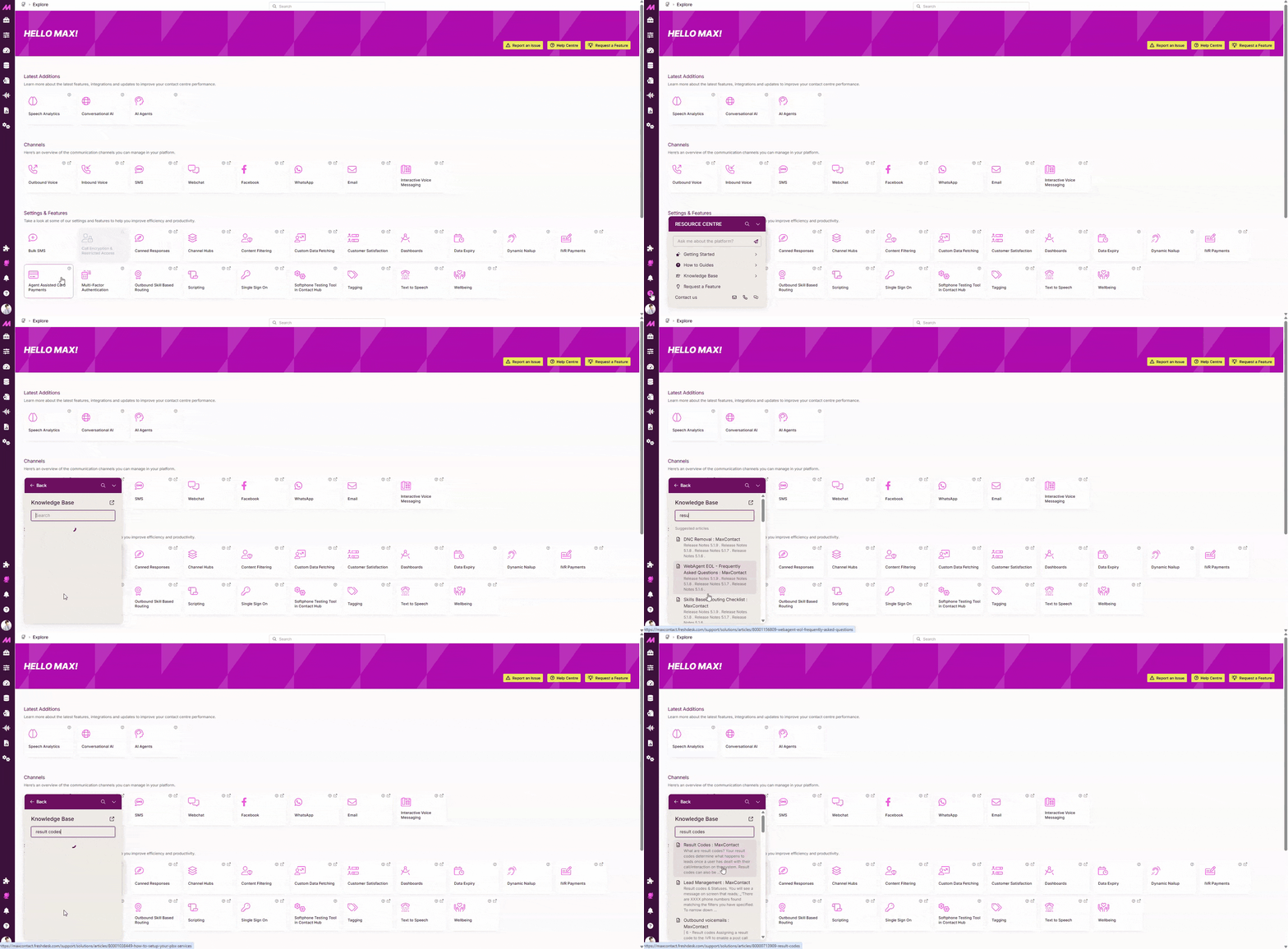
Step-by-Step Guided Tours
Guided Tours walk you through key processes directly within the product, step-by-step. They guide you to exact areas you need, highlight the relevant settings, and explain what each step is used for, so nothing is missed.
These tours are designed to:
- Help you complete tasks confidently
- Reduce confusion around complex processes
- Demonstrate new features as soon as they’re released
This means you can learn and adopt new functionality immediately, without having to search through release notes or documentation.
We’ve also reviewed common support desk queries to ensure the guides we build focus on what matters most to our customers. From everyday tasks to frequently requested processes, like blocking an inbound caller, making them quick and straightforward to complete.
.gif)
AI-Powered Chat Assistant
The AI chat assistant is trained on our latest solution articles and product information, so you can feel confident in the answers it provides.
Alongside each response, you’ll also be shown the articles and guides that informed the answer, allowing you to explore further and build deeper knowledge when needed.
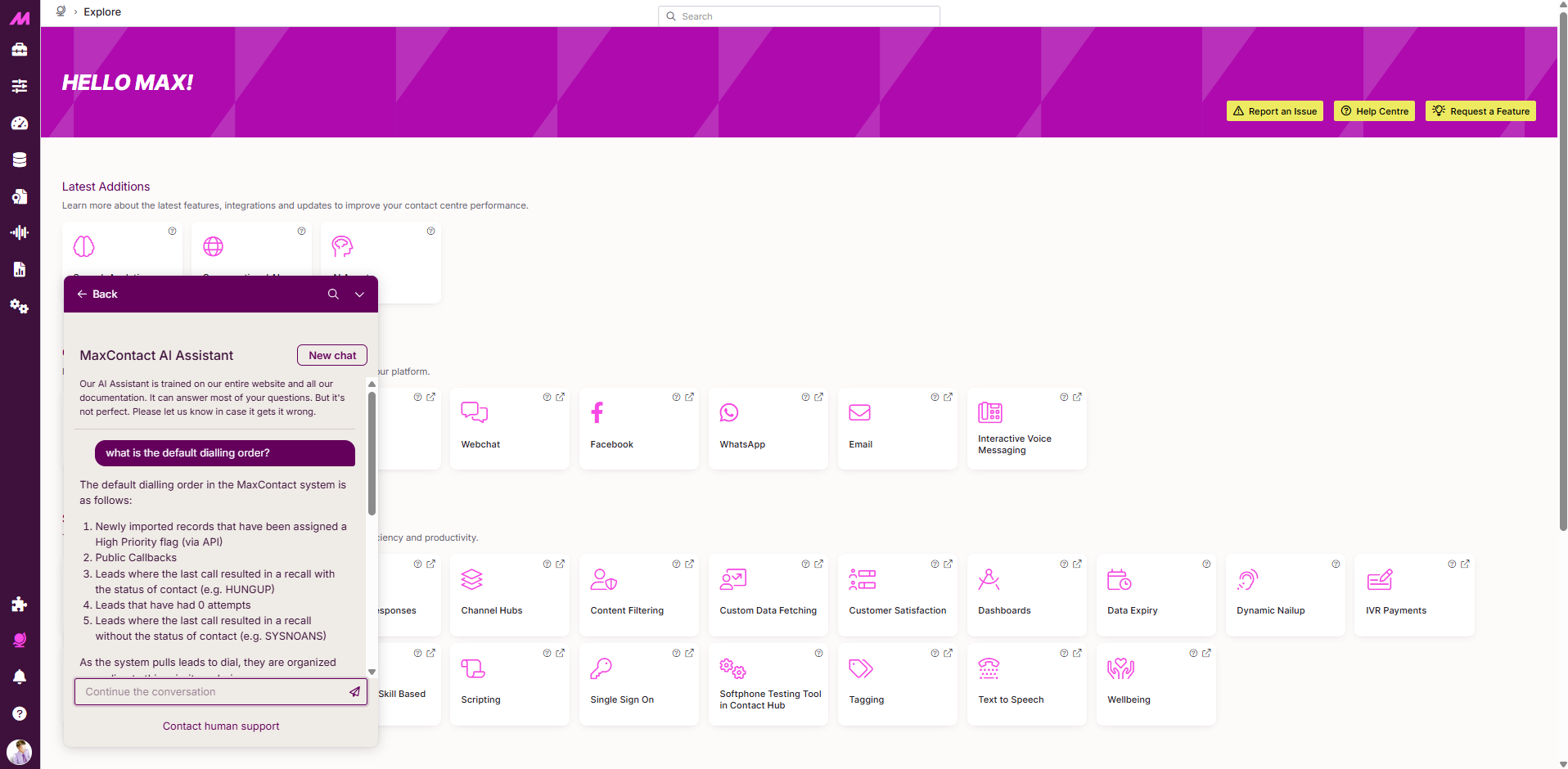
Contextual Help, Tailored to Each Product
Each Resource Centre is built specifically for the product it sits within.
For example:
- In Management Hub, you’ll see content and guides relevant to configuration and administration
- In Conversation Analytics, help is tailored specifically to analytics features
- In Contact Hub, users can self-train through guided walkthroughs directly in the product
What This Means for Support Going Forward
Our Support team isn’t going anywhere.
Resource Centres are designed to complement human support, not replace it. By enabling faster self-service for common questions and tasks, our Support team can focus more time on complex, high-priority issues, helping deliver meaningful resolutions when you need them most.
We’re excited to launch Resource Centres and look forward to seeing how they help make your day-to-day work simpler and more efficient.
Resource Centres will be gradually rolled out over the coming weeks, launching in Management Hub and Contact Hub, with Conversation Analytics to follow.

AI Call Screening: What It Is, Why It Matters, and How MaxContact Helps You Stay Ahead
Outbound contact teams are facing a new reality. The calls that used to connect are now being intercepted - not by answerphones, but by AI.
The Challenge: Are Connect Rates Under Pressure?
Outbound contact teams are facing a new reality. The calls that used to connect are now being intercepted - not by answerphones, but by AI.
According to our latest research, 42.8% is the average connect rate for UK contact centres, with 38% of respondents reporting connect rates between 40-59% [Source: MaxContact KPI Benchmark Report 2025-26].
These numbers tell only part of the story. Behind them lies a fundamental shift in how customers interact with incoming calls, and outbound teams need to understand what's happening - and more importantly, how to adapt.
What Is AI Call Screening?
AI call screening is smartphone technology that uses avirtual assistant to answer calls from unknown numbers. When an incoming call arrives, the AI asks the caller for their name and purpose, then transcribes the response in real-time on the user's screen. The user can then decide whether to answer, decline, send a text reply, or report the call as junk.
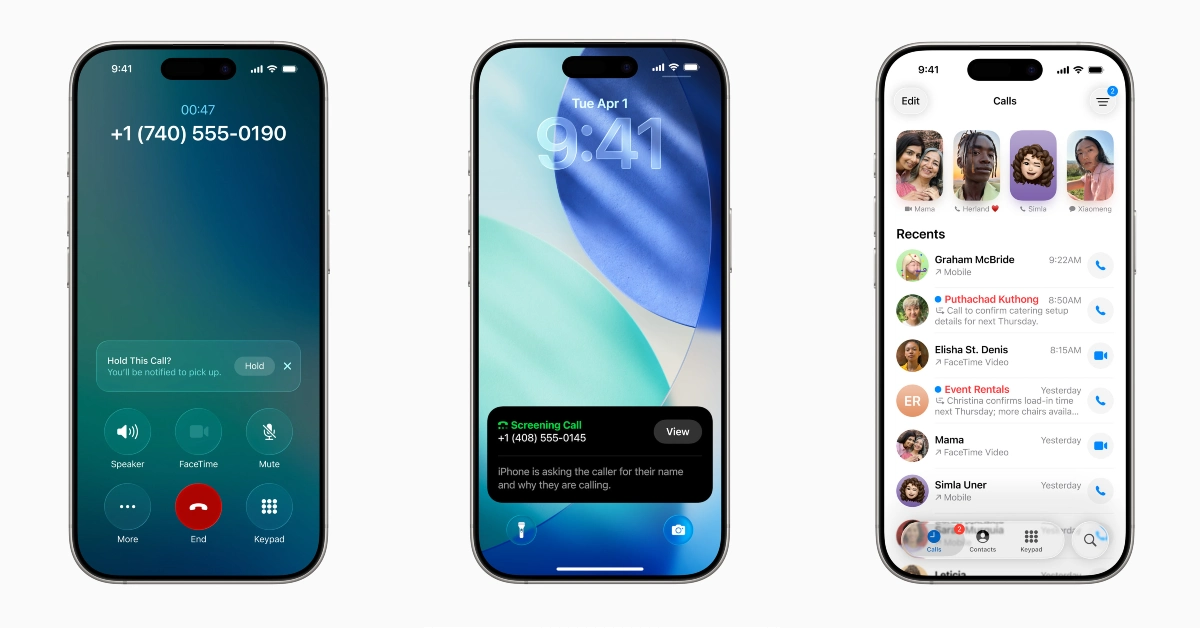
How It Works for End Users
- iOS Devices: When a call from an unknown number arrives, users see a "Screen Call" option. Tapping it triggers an automated voice that asks the caller for their name and reason for calling. The user doesn't hear the audio initially - instead, they see a live, on-screen transcript of the caller's response. Based on this transcript, they can accept, decline, reply via text, or report as junk. Users can configure their iPhone settings to automatically screen all unknown callers, send them directly to voicemail, or allow calls toring through normally. If they've spoken to that number before or have it saved, the call isn't classified as unknown and by passes.
- On Android (Google Pixel) Devices: Users can manually tap a "Screen call" button or set the feature to automatically screen calls from spam, first-time callers, or all unknown numbers. When automatic screening is enabled, the phone may not even ring - a transcript of the screened call appears later in the call history. The Google Assistant informs the caller they're using a screening service, asks for their name and purpose,and can even ask clarifying questions like "Is it urgent?" on the user's behalf.
The Impact on Outbound Contact Strategies
Research on our customer base shows that currently, less than 0.37% of outbound calls are hitting iOS call screening services. While this figure suggests relatively low adoption now, industry analysts expect it to compound over time as the technology becomes embedded in everyday life.
Answer Machine to Call Screen Detection.
MaxContact use Answering Machine Detection (AMD) technology to identify when calls reach voicemail. AMD often identifies AI call screening as a standard answering machine.
When using automated dialling modes - predictive orprogressive dialling with AMD enabled - calls are flagged as "Answer Machine" and routed to the IVR plan for answering machines. If a contact answers the call while the IVR message is playing, they won't be connected to an agent. Instead, they'll see a transcript on their phone showing who called, as stated in the recorded message.
While AMD technology catches many screened calls, it isn't foolproof - a number of these calls may still get through to agents. If answer machine detection isn't enabled, agents will be connected to AI call screening when activated.
What This Means for Your Connect Rates
AI screening tools are acting as gatekeepers, allowing customers to decide whether calls are worth their time. For outbound teams, this might mean:
- Reduced agent connection rates – More calls being intercepted before reaching the intended person
- Wasted agent time – Agents speaking to AI screening services instead of real customers
- Missed opportunities – Prospects receiving incomplete messages or no context about why you're calling
- Brand perception risks – Silence, dropped calls, or robotic IVR messages creating negative first impressions
According to our benchmark data, the average contact rate (percentage of connected calls that reach the intended person) is 43.2%,with 39% of respondents reporting rates between 40-59%. As AI call screening adoption grows, maintaining these rates will require strategic adaptation.
MaxContact's Solution
At MaxContact, we're tackling AI call screening head-on with a comprehensive approach that combines smart automation with agent training. Our strategy ensures you maintain connect rates while delivering consistent, professional brand experiences.

The Automated Strategy
(When AMD Detects the Screener)
For calls that are correctly identified as answering machines by the system, MaxContact enables you to:
Use IVR Routing for Answering Machines Set upspecific IVR routing that plays when the system detects an answering machine. Your IVR should deliver a clear, purposeful message that explains who iscalling, why, and how to get back in touch.
This approach ensures that even when your call hits AIscreening, the person receives a complete, professional message they can reviewin their call transcript. It's transparent, compliant, and positions your brandas respectful of their time.

The Agent-Led Strategy
(When Screened Calls Reach Agents)
For calls that AMD doesn't catch - or if you don't use AMD - MaxContact recommends training agents to recognise and respond effectively:
Train Agents to Identify AI Screening Agents must be trained to recognise the distinct voice of an AI screening assistant, which sounds different from a genuine customer.
Deliver Personalised, Concise Messages When an agent identifies an AI screener, they shouldn't hang up. Instead, they should respond clearly and concisely with a personalised message. For example: "Hi, thisis Sarah from MaxContact. I'm calling for John regarding the information he requested on our website." If the person doesn't pick up, agents should leave details on how to get back in contact.
This gives the person screening the call the clear, concise information they need to decide to accept it.
How MaxContact's Platform Supports Your Outbound Strategy
MaxContact provides the tools you need to implement theabove strategies effectively:
Intelligent Dialling with AMD
Our automated dialling technology (predictive and progressive modes) includes industry-leading Answer Machine Detection. When AMD identifies a screened call, it's automatically routed to your configured IVR plan, ensuring consistent messaging.
Flexible IVR Routing
MaxContact's IVR capabilities let you create specific routing plans for answering machines. You can craft messages that clearly identify your organisation, explain the reason for calling, and provide callback information - all essential for making a positive impression when calls are screened.
Agent Coaching
Our Conversation Analytics features help management identify AI screening and uncover the openers that work best. Train agents on delivering clear, concise messages that maximise the chances of prospects accepting the call.
Comprehensive Reporting
Track how often your calls are hitting answering machines (including AI screening), monitor connect rates and measure the effectiveness of your strategies with MaxContact's reporting suite.
Best Practices: Adapting Your Contact Strategy Today
AI Call Screening is here, here's how to optimise your outbound strategy now:
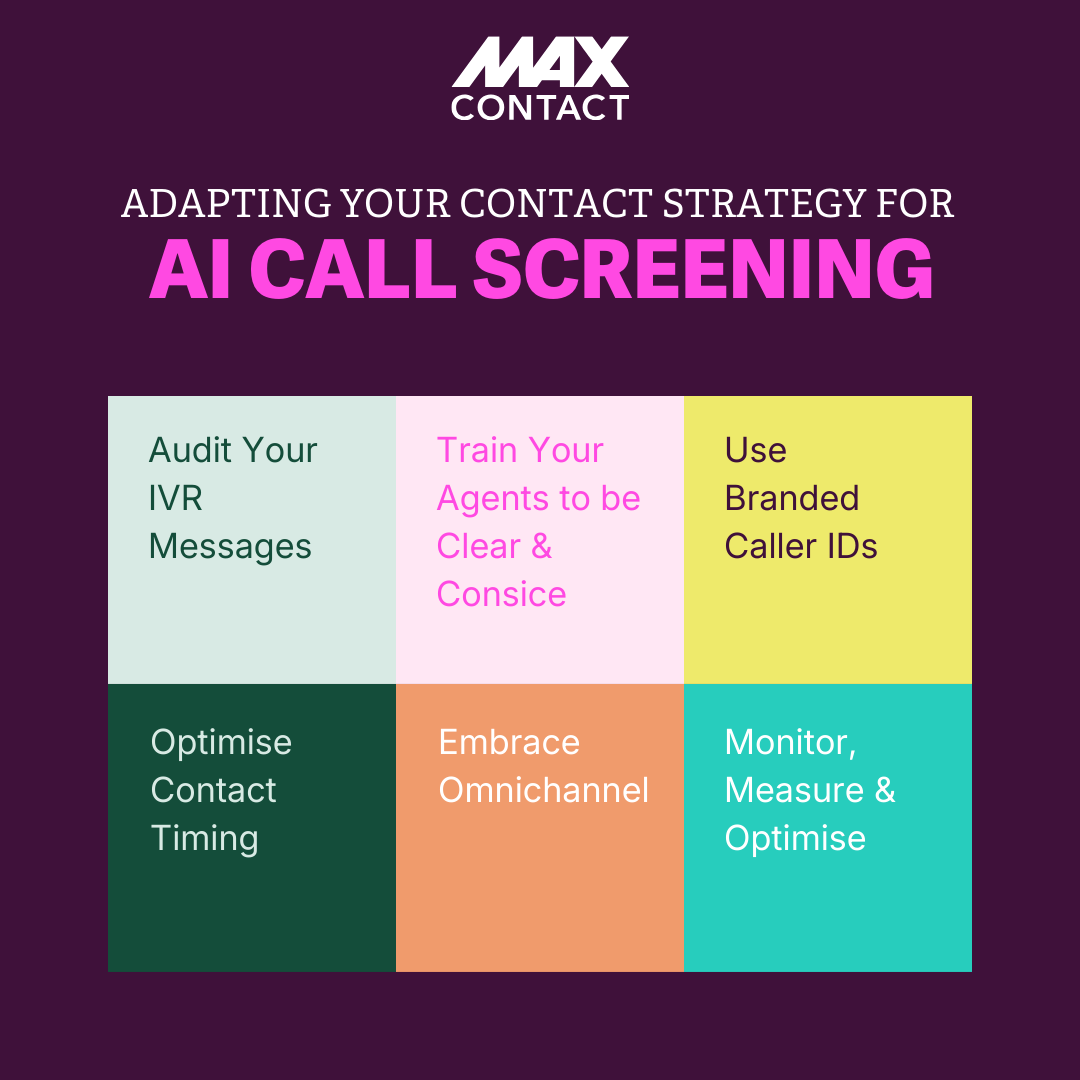
1. Audit Your IVR Messages
Review the messages played when AMD detects an answering machine. Ensure they clearly state:
- Who you are (company name, agent name if possible)
- Why you're calling (the value proposition or reason)
- How to get back in touch (phone number, website, email)
Keep messages concise—under 30 seconds—and professional.
2. Train Your Agents
Conduct training sessions where agents learn to:
- Recognise the sound and cadence of AI screening assistants
- Deliver clear, personalised responses when they identify screening
- Leave complete information if the person doesn't pick up
Role-playing exercises can be particularly effective here.
3. Leverage Branded Caller ID
Consider using branded caller ID services that display your company name on incoming calls. This transparency increases the likelihood that prospects will answer or trust the call even when screened.
4. Optimise Contact Timing
Use MaxContact's intelligent targeting to call prospects attimes they're more likely to answer. Our platform allows you to build lists with differing contact windows, reducing the chances of hitting screening technology.
5. Embrace Omnichannel
Don't rely solely on voice. Use MaxContact's omnichannel capabilities to follow up via SMS, WhatsApp, email, or web chat when calls don't connect. Multi-channel strategies significantly improve overall contactrates.
6. Monitor and Measure
Track your connect rates, contact rates, and conversion rates over time. Use MaxContact's reporting suite to identify trends and measure the impact of your AI call screening strategies.
The Bottom Line: Stay Ahead of the Curve
AI call screening isn't going away—if anything, adoption will accelerate. But with the right strategy and technology, your outbound teams can not only maintain performance but improve it.
MaxContact's approach—combining intelligent automation with agent training—gives you the tools to adapt now.
Remember: Successful teams will adapt to AI call screening with transparency, branded caller IDs, and pre-call context, working with AI to increase responsiveness and to maximise every opportunity.
Ready to Future-Proof Your Contact Strategy?
If you're concerned about how AI call screening is affecting your connect rates get in touch with MaxContact today.
Our team of contact centre experts can audit your current strategy, identify opportunities for improvement, and show you how our platformhelps you stay ahead of emerging technologies.
Request a Demo | Download Our Benchmark Report
The Best Dialler Software for Contact Centres: Compare Types, Features & Options
Auto dialler software can transform the way your contact centre operates, but only if it’s chosen wisely.
At its core, an outbound dialler automates the process of connecting agents with customers. The best diallers, however, go far beyond just making calls. They reduce idle time, improve compliance, and empower agents to deliver faster, more personalised customer experiences.
With so many options on the market, from global enterprise platforms to leaner, budget-friendly tools, finding the best dialler software can be overwhelming.
The “best” isn’t always the biggest name; it’s the one that fits your business goals. Whether that’s maximising agent productivity, staying ahead of compliance rules, or giving customers smoother, more human conversations.
This guide breaks down what defines the best auto dialler software, exploring key features, the main types of diallers, and how to identify the right providers for growing contact centres.
Key features that define the best dialler software
If you’re evaluating dialler systems, the most important step is understanding which features separate a good system from a great one. Across industries and use cases, these are the core features that define the best dialler systems time and again:
Features & why it matters:
Compliance built in
Regulations like Ofcom (UK) and GDPR carry heavy fines if they’re ignored. The best diallers have safeguards built in, such as call pacing rules, customer consent management, and automatic record keeping. This helps agents stay focused on conversations without risking penalties.
Multiple dialler modes
Different campaigns need different approaches. A predictive dialler is great for high-volume sales where speed matters. A preview dialler, on the other hand, gives agents context before making sensitive debt collection calls. The best dialler software offers flexibility with multiple modes in one platform.
CRM and data integration
A dialler that can’t talk to your CRM will slow agents (and your call handling) down. Integration means customer details, history, and preferences are available instantly, allowing agents to personalise interactions and avoid repeated questions.
Ease of use and adoption
Even the most advanced system won’t deliver results if agents find it difficult to use. Look for intuitive interfaces, drag-and-drop campaign management, and fast onboarding so teams can adopt quickly without weeks of training.
Reporting and analytics
Data drives performance. Real-time dashboards, call recording, and speech analytics help managers track KPIs like contact rate, conversion, and compliance. The best diallers capture data and make it actionable.
Cost efficiency and scalability
A dialler should grow with your business. Scalable licensing, flexible integrations, and automation tools help you handle more calls and campaigns without proportionally increasing headcount or costs.
Types of diallers explained
As mentioned above, when you’re weighing up dialler systems, one of the biggest considerations is how flexible the software is, with dialler modes being a key focus.
Let’s dig into what different dialler modes offer in more detail.
A platform that only offers a single mode will limit your campaigns, whereas the best auto dialler software gives you the choice to switch depending on context.
Here are the most common dialler modes and when to use them:
- Predictive: Maximises agent talk time by dialling multiple numbers and only connecting live answers (great for high-volume sales).
- Preview: Gives agents customer details before the call (ideal for sensitive or complex conversations like debt collections).
- Progressive: Dials one number per agent with context as the call connects, balancing pace and preparation.
To explore dialler modes further, read our blog on choosing the right dialling mode
Best Auto Dialler Software Options in 2025-26
Dialler modes are an important consideration, but they’re only part of the picture. The right choice of software is dependent on the type of provider you go with. While some dialler platforms are built for huge enterprise operations, others strip back features to keep costs low. Meanwhile, there are specialist providers that aim to balance advanced functionality with usability.
Let’s look at the differences between providers:
1. Enterprise Platforms
Global players like Five9, Genesys, or NICE dominate the top end of the market. These platforms offer vast functionality across voice, digital, and AI, which is ideal for multinational contact centres with thousands of agents.
However, with scale comes complexity. Implementation of enterprise-level dialler software can take months, pricing is often layered by feature and licence, and day-to-day management may require technical teams. For mid-sized or fast-growing contact centres, it often means paying for features they’ll never use.
2. Budget or Basic Diallers
At the other end of the scale, low-cost diallers focus mainly on outbound calling. Tools like Vicidial, Primo, JustCall, TCN, and Aircall are popular for their simplicity, quick setup, and low upfront cost, which makes them attractive options for small teams or short-term outbound campaigns.
However, the biggest trade-off is capability. Budget systems often lack advanced features, like Ofcom-compliant dialling controls, CRM integration, or omnichannel functionality. They can also fall short when it comes to reporting or automation, requiring more manual oversight, leading to a greater risk of errors.
For regulated industries such as financial services or debt collection, these limitations can create compliance risks and hinder scalability. They’re great for getting started, but not always suited for growing or high-stakes contact centre operations.
3. Specialist Providers
This is where MaxContact stands out. We bridge the gap between affordability and advanced capability.
MaxContact is built for mid-sized and growing contact centres that need enterprise-grade functionality without enterprise overheads. You get:
- Multiple dialler modes (predictive, progressive, preview) to match your campaign needs.
- Built-in compliance with Ofcom, GDPR and FCA guidelines.
- Fast setup and simple integration with existing CRMs and systems.
- UK-based support and expert onboarding.
- A platform that balances performance, compliance, and customer experience.
Best overall for mid-sized contact centres: MaxContact
- Offers predictive, progressive, and preview dialler modes
- Built-in compliance with Ofcom, GDPR, and FCA guidelines
- UK-based support with fast setup and CRM integration
Benefits of Choosing the Right Dialler
Choosing the right dialler isn't just about efficiency, although that's a big positive on its own. And yes, a dialler also helps your contact centre do more with what you've got. But the real value runs deeper. Hand in hand with a data-driven contact strategy, the right dialler transforms how your contact centre (and your agents) work.
Here are the benefits:
1. Your agents actually want to work
Nobody likes staring at a screen waiting for calls to connect. A smart dialler cuts that idle time dramatically. Predictive and progressive modes keep outbound campaigns flowing, so agents focus their energy on conversations, not manually dialling numbers or waiting for calls to connect.
Add CRM integration and live dashboards into the mix, and you get more than better numbers; you get engaged agents who can focus on conversations that actually matter.
2. Your customers notice the difference
When your dialler talks to your CRM and routing tools, customer journeys improve overnight. Intelligent routing gets people to the right agent the first time. Integrated data means your team knows exactly who they're speaking with before they even say hello.
That translates into shorter waiting times and fewer "let me transfer you" moments. Customers have conversations that feel informed and personal, the kind that people remember for the right reasons.
3. Compliance that runs itself
Between Ofcom, GDPR, and FCA requirements, staying compliant is complex. Manual oversight just doesn't cut it anymore, especially when your business is scaling. The best diallers handle compliance in the background, managing call pacing, respecting consent preferences, and protecting customer data.
That means fewer slip-ups and unexpected fines, and a reputation that shows you take data protection seriously.
4. Built to grow with you
Good dialler software scales with your business. By automating admin and streamlining workflows, your agents handle larger volumes without you needing to increase headcount.
The right platform adapts as you evolve with new channels, fresh campaigns, and changing regulations. No expensive rebuilds or constant retraining.
The best dialler software makes you faster. But more critically, it finds that sweet spot where productivity, compliance, and customer experience all work together.
Why Businesses Choose MaxContact: One of the Best Dialler Software Solutions for Contact Centres
When businesses search for the best dialler software, they’re looking for a balance between performance, compliance, and ease of use. That’s where MaxContact stands out. Designed for mid-sized and growing contact centres, our dialler software delivers enterprise-grade functionality without enterprise overhead.
Here’s why organisations across industries choose MaxContact’s dialler:
1. Scalable efficiency without extra headcount
We Finance Any Car used MaxContact to manage rising lead volumes while keeping staffing levels steady. With CRM integration and automated re-dialling, their team spends more time talking to customers and less time on manual admin, improving productivity and conversion rates.
2. Flexible control and faster campaign management
Dudley Council wanted to reduce reliance on third parties and adapt in real time. MaxContact gave them control to update campaigns and reporting on their terms; faster, cheaper, and more flexible.
3. Enterprise power, simple usability
The Redwood Group needed a platform that could support multiple departments, regulated debt recovery campaigns, and high outbound volumes. With predictive, progressive, and manual dialling modes, advanced compliance, and intuitive reporting, they got the best of both worlds: power and simplicity.
In short, MaxContact brings you all the essential dialler modes, built-in compliance, and UK-based support that grows with your team, without paying for features you’ll never use. That’s why it’s consistently rated among the best dialler systems for UK contact centres.
Get the power and compliance of an enterprise dialler without the complexity. Book a demo with MaxContact to see how our dialler software can boost productivity, compliance, and CX in your contact centre.
FAQs: Choosing the Best Dialler Software
What is the best dialler software for UK contact centres?
MaxContact is one of the best dialler systems for UK contact centres, offering predictive, progressive, and preview dialling with built-in Ofcom, GDPR, and FCA compliance. It's specifically designed for mid-sized and growing teams that need enterprise capability without enterprise overhead.
What makes a good auto dialler?
The best auto dialler software combines speed, compliance, and customer experience, with CRM integration, intelligent call routing, and clear reporting to guide agent performance. It should also offer multiple dialling modes to match different campaign types and scale efficiently as your contact centre grows.
Is MaxContact a predictive dialler?
Yes. MaxContact supports predictive, progressive, and preview dialler modes, helping teams tailor outbound strategies for sales, collections, and service campaigns. You can switch between modes depending on campaign needs, all within the same platform.
How does MaxContact compare to enterprise dialler platforms?
While global providers like Five9 or NICE CXOne target large enterprises with complex needs and large budgets, MaxContact delivers similar capabilities in a simpler, more affordable, and UK-supported solution ideal for growing contact centres. You get enterprise-grade features, predictive dialling, compliance automation, and advanced reporting, without the six-month implementations and features you'll never use.
What happens if we outgrow our current dialler?
This is a common concern and a real risk with budget diallers that lack scalability. Signs you've outgrown your system include: hitting user limits, needing features that require expensive add-ons, struggling with compliance as regulations tighten, or lacking the reporting depth to optimise performance.
MaxContact is built to scale with you. As your contact centre grows with more agents, more campaigns, and more complexity, the platform adapts without requiring you to rip and replace. You're not locked into a system you'll need to migrate away from in 18 months.
Can dialler software integrate with our existing CRM?
The best dialler systems, including MaxContact, integrate with major CRMs like Salesforce and HubSpot, as well as custom systems via API. This integration is critical because agents see customer data instantly when calls connect, eliminating the need to switch between systems or ask customers to repeat information.
During a demo, always ask to see the specific CRM integration you need, not just whether it's "possible."
Is cloud-based or on-premise dialler software better?
For most contact centres, cloud-based is the clear winner. Cloud systems offer:
- Faster implementation (weeks, not months)
- Automatic updates and compliance changes
- Scalability without hardware investment
- Remote working capability (essential post-pandemic)
- Lower upfront costs
On-premise systems made sense a decade ago, but unless you have very specific data residency requirements or legacy infrastructure dependencies, cloud-based diallers like MaxContact offer far more flexibility and value.