featured
article
Fresh thinking and practical takeaways to help your business improve customer engagement and unlock better performance.

discover THE
latest articles
.png)
The real cost of not having a payment IVR for credit and collections
A few years ago, IVRs (Interactive voice response) were not much loved by consumers, and even today, poorly implemented systems can leave callers fuming on the other end of the phone. But as customers have got more used to talking to technology (think Alexa, Google Assistant and more), and IVR systems have got more sophisticated, it has become ever more essential.
Today, almost three-quarters of customers think they should have the ability to solve their own product or service issues, and improved self-service is among the top three priorities for businesses that want to improve CX.
IVR is worth its weight in gold when it comes to self-service for credit and collections. Is the price of having a payment IVR worth paying?
What is a payment IVR?
A payment IVR allows you to process PCI-compliant payments without the hassle. Your contact centre agents can take payments over the phone – and automatically as part of your IVR – both compliantly and securely.
How can you take payments in your contact centre?
Take payments online
Create secure and convenient payment links to send to customers via digital channels like web chat. This removes the need for your team’s intervention and allows you to take customer payments 24/7.
Assisted payments
Your team can take payments on calls. At the point of payment, customers enter card details using the phone keypad. After payment, the conversation continues.
Automated payment phone line
Automated payment, or payment IVR, allows customers to self-serve. The service is available 24/7, reducing the number of missed payments and increasing customer satisfaction.
How does a payment IVR help your credit and collections teams?
- Save time on credit and collections: Automation gives your customers the payment options they want, speeds up cash collection to improve cash flow.
- Reduce costs, not service: Automate routine customer conversations, saving time, money and effort.
- Value your team’s time: Delight your staff and reduce churn by replacing repetitive work with automated payment lines and easy payment options. Give teams back the time they need for more complex calls.
What happens if you don’t have a payment IVR?
Unproductive agents
If you don’t have a payment IVR solution, the professional agents you employ, equip and train spend significant amounts of time doing little more than entering numbers into a digital data management system. They check identification details and type in credit card numbers, or transfer to payment gateways again and again and again.
It’s a waste of talent. IVRs can do all this via touch tones or voice activation, without customers ever having to speak to an agent. Won’t they miss the human touch? Not at all. When they’re paying bills or making payments, consumers simply want the quickest and most efficient experience, and what they want most of all is to avoid waiting in call queues. IVRs can help give them what they want.
It also frees up your agents for more productive tasks, like the kind of deeper dives into customer issues that increase customer satisfaction ratings, as well as the escalation of unpaid bills and late payments.
Unnecessary costs
According to one study, the average cost of a call to a contact centre agent is £4.27, made up of staffing costs and overheads. Some of that expense is unavoidable, but many contact centres still have agents taking calls they really don’t need to take.
A payment IVR system can handle many of those calls at considerably reduced cost, and taking payments is exactly the kind of simple, repetitive task that automation was designed for. It’s often said that IVRs can reduce the cost of simple calls by around 35%. In addition, IVR systems don’t take breaks, don’t need holidays and don’t need to be equipped with a desk and chair.
We’ve been talking about inbound calls, but you can also drive huge efficiencies by combining outbound operations by automating ‘reminder to pay’ calls or SMS to customers approaching payment deadlines.
Limited opening hours
When you rely on live agents to take payments and offer account information, you’re limiting your service to office hours. Even with a shift system in place, many contact centres can’t justify the expense of keeping the lights and air conditioning on after nightfall.
With payment IVR, you can run a 24 hour operation, 365 days a year. That increases satisfaction among customers who work unsocial hours or have busy lives and want to be able to complete financial housekeeping at a time of their choosing. It also reduces the chances of missed payments and payment defaults.
Customers understand that they can’t do everything at midnight. But they’re increasingly aware that paying bills and obtaining basic account information can and should be a round-the-clock service.
Insecure payments
If you take payments over the phone, you have to be PCI compliant at the very least. A PCI-compliant payment IVR can help you achieve compliance and handle payments and account enquiries in the most secure way.
That’s partly because an automated system is simply more secure than an agent noting down card details manually. With payment IVRs, sensitive information is processed securely within the system. With manual payments, a scribbled note containing sensitive information could end up anywhere. And though it’s unlikely that an unscrupulous agent will take customer card details, it’s not unheard of.
Payment IVRs can integrate with accounting software and debt management systems to automatically update account information too – win, win.
Secure payment processing for credit and collections teams
For efficient credit and collections, it’s essential to give customers easy ways to check accounts and make payments, while also reminding them when payments are due. At the same time, no business wants to spend unnecessary time and expense on chasing and taking payments. A modern, user-friendly and easily tailored IVR solution is becoming a standard tool in this arena, as businesses seek greater efficiency at lower cost.
Speak to an expert to find out more about our PCI-compliant payment IVR solutions.

How To Manage Complaints
Customer satisfaction is intrinsically linked to strong business performance. In today’s world, customers have more power than ever and are able to share their experience with your business in a variety of ways – from online reviews to social media and beyond. This is great, if they’re talking about your organisation in a positive light, but what if you fail to provide a positive customer experience? Your customers will complain.
According to a recent survey by the Institute of Customer Service, customer complaints are at their highest level in 12 years. While Google search trends show searches for ‘how to complain’ have been rising steadily since 2010, reaching its peak in March 2021
Jo Causon, chief executive at The Institute of Customer Service, said: “We are at a critical juncture for the UK economy. As we emerge from the Covid-19 pandemic, customers have become ever more discerning with where they spend their money and it is essential that organisations pay close attention to their full service offering.”
Worryingly, 61% of consumers revealed that they believe UK businesses think their service is better than it is, in a new survey carried out by MaxContact.
So how do you know if the service you’re offering customers really meets their expectations? And how do you prevent complaints from happening, in order to protect your business?
Complaints aren’t all bad
The truth is, prevention isn’t always the cure. Customer complaints are actually essential for your business. Why? To learn from and continually improve.
No matter how much criticism hurts, it’s vital for growth. In fact, a study by Harvard Business Review found that customers who have a complaint handled in less than 5 minutes go on to spend more on future purchases
How to learn from complaints
Analyse
Are you seeing similar complaints cropping up over and over again? Identifying patterns and repetitions of particular complaints can help you to recognise key issues and work on areas of improvement. Customer complaints can help highlight areas where your product needs work, or where staff members may need extra training. By observing where complaints are focussed you’re able to prioritise and address issues clearly.
Create a feedback loop
Complaints open up opportunities for your team to have honest discussions with your customers. Create opportunities for a feedback loop and welcome suggested improvements into your business rather than waiting for customers to come to you. See it as an opportunity to improve rather than an attack on your organisation. Having open conversations with customers can help customers feel like the key components to your success that they are.
Create guidelines to support staff
Dealing with angry customers is tough at the best of times, but it’s made even more difficult if you don’t have the right support tools in place to help. Creating clear guidelines and policies for your staff is vital to turn the dissatisfied into satisfied customers, and align your team’s responses so complaints are dealt with consistently. In most cases, customers are looking for clarity, so having clear processes in place will provide a quality customer experience.
Multichannel approach
Be clear on how customers can complain to remove any further pain points. If your customer wants to complain but can’t find the right channel to do so, it’ll only cause more frustrations and potentially lead to a worse complaint. With more customers expecting organisations to interact through digital channels, having a multichannel approach to serve a variety of customer needs is vital.
Jo Causon, chief executive at The Institute of Customer Service, said: “Those brands that have performed best in the UKCSI are those that have maintained a key focus on the whole customer experience journey – providing honest, genuine communication across different channels.”
So instead of trying to mask over complaints or avoid them – embrace and learn from them to continually improve your customers’ experience.
MaxContact is a cloud contact centre solution provider, offering predictive outbound dialling and PCI-compliant omnichannel solutions built around your needs. Find out more about us.
Stop it, we’re sick of the ‘Covid’ excuse
Since March 2020, how many times have you heard ‘due to Covid, we can’t do x, y and z’ or ‘there’s a delay due to Covid’? More than a handful, we bet, and over a year on, the excuse is starting to wear thin. Whilst Covid and its restrictions have seriously impacted people and businesses, UK consumers are fed up with brands STILL using Covid as an excuse for poor customer service.
A recent UK study of 10,000 people (by the UK Institute of Customer Service) showed that a quarter of us said organisations had used Covid as an excuse for poor service, including late deliveries.
Jo Causon, the institute’s Chief Executive, stated that the crisis has “exposed” a lack of proper investment in service.
Increasing consumer demand, skills and people shortages and lack of proper investment in tech infrastructure have added an immense amount of pressure for companies walking the tight rope of pleasing customers whilst dealing with issues behind the scenes.
And for what result? Complaints about customer service are at the highest level since 2009.
In contrast to this, nearly a quarter of us have told a brand that we were happy with the service we received when we weren’t and well over half (55%) of us make excuses to end conversations with company representatives.
So, what’s changed during the pandemic?
During just two weeks during the pandemic, the average company in a Harvard Business Review study saw the percentage of calls scored as ‘difficult’ more than double from a typical level of 10% to more than 20%.
Issues related to the pandemic dramatically increased the level of customer emotion and anxiety in service calls, making a job that is hard for reps on a ‘normal’ day far more challenging. In addition to this, teams were battling tech issues and working from home. The study showed ‘a massive uptick in instances of both customers and reps saying, “I can’t understand you,” and some companies in the study saw hold times balloon by as much as 34 percent and escalations (calls sent up the chain of command) skyrocket more than 68 percent’.
Where are brands going wrong?
Covering over the cracks
If your business has not got the right technology or systems in place, hasn’t got all the answers for customers, is running on less employees than is needed, and asking your customer-facing teams to do ‘their best’ – you’re creating a recipe for disaster. It’s time to realise the need for proper investment in the right tech, tools and staffing levels for teams to do their job properly.
Processes that help the company, not the customer
‘Due to our process…’ is probably one of the most irritating lines any customer can hear, with it instantly coming across as a get-out clause for anything slightly tricky, especially when said process does nothing to help a customer. Organisations shackle reps with standard customer-service policies (such as rules about extending bill payments) that pre-date the pandemic, and agents are often ‘powerless to help’. A study found that low-performing reps were 27% more likely to hide behind policy on Covid-19 related calls than their higher-performing peers.
The moral of the story is to update processes for the world we live in, giving agents the flexibility to amend based on the circumstances and thus adopting a customer-first approach.
.png)
Speech Analytics: Turning Conversations into Insights
Conversation analytics isn’t a new thing. In fact, it’s been around for nearly two decades. But thanks to developments in AI and natural language processing (NLP), speech analytics is growing in popularity and is a powerful tool for contact centres. But why is speech analytics needed?
What is speech analytics?
Call centre speech analytics (or conversation analytics) uses technology to analyse recorded phone conversations between call centre agents and customers. AI powered speech analysis helps to identify trends, patterns and areas for improvement in customer service, agent performance and overall contact centre operations.
Conversation analytics isn’t a new thing. In fact, it’s been around for nearly two decades. But thanks to developments in AI and natural language processing (NLP), speech analytics is growing in popularity and is a powerful tool for contact centres. But why is speech analytics needed?
Why do call centres need speech analytics?
75% of customers will spend more to buy from a company that offers a good customer experience (CX). On the other hand, nearly half of consumers would ditch a brand for a competitor due to poor CX.
In other words, good CX is a huge win for your business. Customers who are happy with the experience you provide will spend more with your business, forgive your occasional mistakes and recommend your products and services to others.
The problem is that it’s not always clear if your customers rate their experience as highly as you hope they do.
Many customers stay silent about their issues, leading businesses to miss crucial feedback. It’s not malice on the customers’ part, but discomfort or wanting to avoid hassle. This silence hurts business and can result in low customer satisfaction (CSAT), higher customer churn rates and reduced sales revenue.
Businesses can’t fix what they don’t know. So, how do we encourage open communication for happier customers and thriving businesses?
How does speech analytics software work?
Speech analytics empowers contact centres by automatically analysing call recordings to understand both agent performance and customer sentiment. It identifies keywords and phrases which reveal customer satisfaction or frustration, even if they didn’t explicitly say it. Looking beyond spoken statements, speech analytics software analyses voice characteristics, like intonation and pitch, picking up on emotions such as happiness, anger or confusion.
To measure agent performance, call centre speech analytics tracks metrics such as time on hold and silence periods, giving insights into both agent efficiency and customer satisfaction.
How is speech analytics used to improve contact centre operations?
The ability to analyse every customer interaction is a powerful tool but how is speech analytics used and what are the benefits?
- Real-time speech analytics software can boost customer satisfaction by 20% and reduce churn
- Proactive Issue Identification: Speech analytics can be used to understand call drivers including emerging problems. Real-time call analysis can alert agents to any new issues and encourage them to address the issue and implement corrective measures to nip the problem in the bud.
- Real-time Sentiment Analysis: Call agents are able gauge customer emotions more accurately throughout the call, allowing them to ease any frustrations and personalise interactions, which all lead to happier customers.
- Targeted Upselling Opportunities: Eradicate the need for relying on your agent’s memory of what’s been said on the call. Real-time analysis can review calls and push alerts to agents to discuss new products or services, driving revenue by 10%.
- Insights from ai speech analytics can be used to improve agent performance and drive engagement
- Personalised Coaching: Coaching your call centre agents is easy with post-call analysis. Review performance and develop targeted training and development plans based on individual strengths and weaknesses.
- Compliance & Quality Assurance: AI-led speech analytics can automate compliance checks across all calls. Real-time analysis (alongside post-call analysis) also prompt agents to read the relevant scripts while the call is taking place. This leads to increased agent compliance and reduces the risk of fines associated with non-compliance.
- Performance Benchmarks and Recognition: Use insights from speech analytics to identify and reward high-performing agents and showcase their successes to motivate and inspire the entire team.
- Automated call analysis can be used to enhance quality management and call handling efficiency
- Quality management: Be more confident in the validity of your quality scores and agent assessments with speech analytics software that automates analysis of all calls rather than relying on a small sample of contact centre interactions.
- Reduce average handling time (AHT): Customers want quick and efficient resolutions over the phone. Speech analytics software can give you powerful insights that help you design better scripts to reduce AHT and cut costs.
One solution to the problem of reticent customers is conversation analytics software. You’ve probably come across hype around speech analytics before – the technology has been around for nearly two decades. The difference today is that it actually works.
The industry certainly seems to think so too. One recent study estimated that the market for speech analytics will grow at a CAGR of 22.14% over the next five years. And we believe its popularity is entirely justified.
Why choose AI-led conversation analytics from MaxContact?
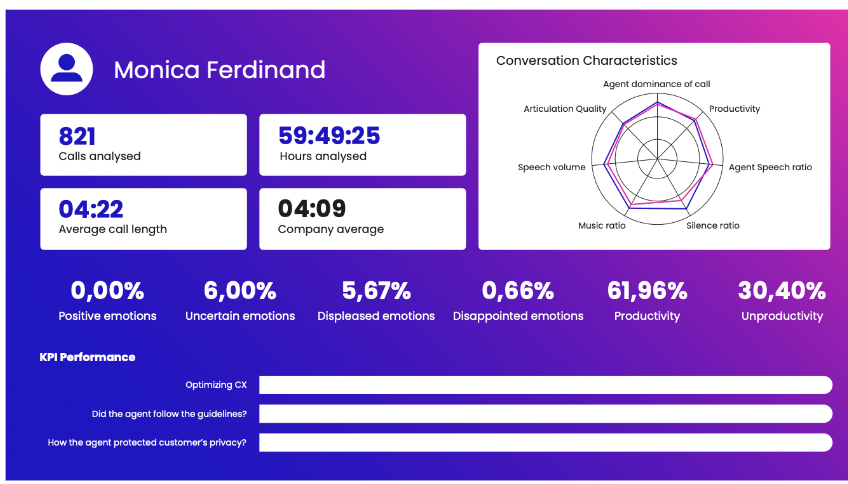
Our speech analytics software will help you to make better business decisions, and understand the ‘why’ behind 100% of your contact centre interactions.
We’ve kept it simple
High-level data is displayed on an intuitive dashboard and further information can be accessed from a central control panel. Simple to set up and easy to understand, MaxContact ai speech analytics provides sophisticated insights at the click of a button.
Powerful filtering at your fingertips
Our advanced solution pre filters nearly 70% of critical and problematic conversations that need further attention. This lets contact centre managers focus on priority issues before it’s too late. Thanks to faster response times, timely interventions and streamlined operations, managers can enhance performance and improve customer satisfaction by coaching agents in real-time.
Easy to integrate
And if all this sounds expensive and complex, it really isn’t. We offer a fully integrated platform designed to work seamlessly with our feature-rich, cloud-based contact centre software.
Conversation analytics from MaxContact gives you the information you need to deliver market-leading CX, even if your customers are not always as candid about your service as you’d like them to be.
Book a customised demo to learn how our AI-led conversation analytics software can understand customer sentiment, improve call quality, and reduce churn in your contact centre.
Leveraging conversation analytics for contact centre improvement
Download our Build a Business Case for Conversational Analytics framework.

Workforce management in your contact centre: cut costs and ace flexible working
Let’s face it, Contact Centre workforce management (WFM) is a bit of a minefield.
The goal of WFM is obvious enough. You want the right number of agents with the right skill levels in place for every shift. Get it right and you maximise revenue opportunity, reduce churn rates and create better customer experiences, while lowering operational costs.
Get it wrong and the opposite happens. Either you’re left with too many agents, or you’re left with too few. In the first instance, agents are left twiddling their thumbs while you hemorrhage money. In the second, customer dissatisfaction grows and overworked staff contemplate less stressful futures elsewhere.
Now add the pandemic into the mix, and the fact that team leaders can’t physically judge the overall productivity of their agents by simply scanning the room. In these circumstances, WFM becomes trickier still.
Getting the balance right?
So how do contact centre managers go about getting the balance right? Traditionally, it’s been a mix of intuition, experience and basic number crunching, but this analogue approach is no longer enough.
That’s because scheduling staff shifts in modern contact centres is more complex than ever. It starts with a forecast of the likely number of inbound enquiries, based on previous experience and known upcoming events. Anything from a Bank Holiday to the start of your latest marketing campaign can seriously impact your inbound forecasting.
Then you have to match that forecast to your available agents, while considering rotas, workload, skill sets, contracted hours, holidays and workforce wellbeing, among other factors.
And depending on your business, you may have to factor in the SLAs you offer your customers, and the ever-changing metrics your C-suite uses to measure the health of the business.
And let’s not forget that contact centres are often omnichannel these days, meaning your responsibility isn’t just to customers who pick up the phone. If you advertise SMS, web chat, email and social media as ways to get in touch, you’d better have the right people on hand to answer digital queries in a timely manner.
We could go on, but you get the picture. Like we say, it’s all a bit of a minefield.
Workforce management: the old school approach
So how do contact centres absorb this tsunami of information, create an accurate forecast of need and allocate agent resources appropriately?
Many of them still do it using a spreadsheet.
It’s an admirably old school approach, but it makes WFM a hugely complex and time consuming task, as businesses manually try to match call volumes to staff availability while also meeting all the criteria mentioned above.
The spreadsheet method also introduces the very real possibility of human error. Put the wrong figure in the right box, or the right figure in the wrong box, and your entire plan could be pushed out of balance.
In fact, this manual WFM approach simply isn’t equipped to handle the complexities of a modern call centre. Many WFM spreadsheets use what’s called an Erlang formula, a mathematical calculation for matching staff numbers to service needs.
If that sounds high-tech, don’t be fooled. The Erlang formula can’t take into account peaks and troughs in call rates, priority callers, omnichannel solutions are scores of other criteria that affect the resource requirement of contact centres today. It’s an outdated solution that errs on the side of caution and frequently leads to overstaffing.
Modern workforce management: accuracy and insight
The alternative is a digital WFM solution. The best of these use sophisticated statistical analysis to make sure call centres always have the right staff in place to reach their goals.
They do all the number crunching for you, freeing up management time for more productive tasks. They take away both human error and the over reliance on outdated mathematical formulas.
So how do they work? Well, MaxContact’s industry-leading WFM uses statistics from the last 12 months to create highly accurate forecasts based on the actual reality of your business, rather than vague assumptions about the sector, or educated guesswork. By analysing data from a full year, the algorithm accounts for seasonal peaks, historical trends and more. By doing so, it provides a highly accurate and cost-effective workforce schedule.
It takes all this information and automates the labour intensive task of shift creation. This takes minutes with MaxContact, though it can take much longer with competing solutions. Rotas can then be assigned to agents with a single click, via email, SMS or calendar integration.
Predicting the future
And MaxContact’s WFM goes further. It lets you build ‘what if’ scenarios, predicting future performance based on past performance and new variables. For example, if you want to answer more calls or reduce call waiting times, feed the figures into the WFM solution and it will estimate the extra resource you need to meet your goals.
Importantly, it also allows you to measure the performance of home based agents, and provides real time reporting on call traffic, cost analysis and more. This data-driven approach makes it much simpler for contact centres to adopt permanent remote or hybrid working models without sacrificing efficiency.
In addition, it makes it much easier to fill in gaps in cover with part-time, home-based agents who need to fit work around childcare or other responsibilities. By doing so, MaxContact WFM gives you the flexibility you need to succeed in a new world of work.
MaxContact’s powerful WFM solution automates a highly labour-intensive process and adds a whole new level of precision. Use it to make the most of your talent, while reducing churn, minimising costs and adopting new, more flexible ways of working. It’s a big step up for your staff, your business, and your customer experience.
A leaders guide to moving to a cloud call dialler solution
After the events of the last few years, contact centre and IT leaders are looking at their contact centre technology and asking if it could be improved. The shift from onsite to more remote and hybrid working arrangements emphasised the advantages of cloud-based solutions in all sorts of areas, and contact centre software was no exception.
Cloud vs. on-premise contact centre software
You probably know the script by now. Cloud-based software allowed agents to swiftly and smoothly transition to remote working almost overnight. It gave them all the features they had on their office handsets, only anywhere and on any device. It allowed managers to monitor productivity remotely.
In a nutshell, cloud was just a lot easier in a crisis than on-premise solutions.
And yet, some contact centre/IT leaders still doubt moving outbound operations to the cloud. That’s understandable. Handing control over crucial infrastructure to a third party is a leap of faith. When sensitive data and painstakingly nurtured customer relationships are at stake, it’s natural to be cautious.
Take a look at the table below for a snapshot of some of the other key differences between on-premise and cloud solutions.
We’ve discussed harnessing the benefits of cloud contact centre software more in-depth in another blog. However, in the rest of this guide, we will be looking at cloud diallers from a contact centre leader’s perspective with four objections we hear every day,explaining how the latest cloud software overcomes them
Overcoming objections to cloud-based dialler
Objection 1: “We won’t be in a crisis forever”
Thankfully, the pandemic is over but life hasn’t exactly gone back to normal. Many companies are still offering flexible, work-from-home call centre agent roles.
So why struggle on with inflexible on-premise software? It’s widely accepted that cloud dialler software make it easier to equip remote workers.. Companies that continue to offer hybrid working as standard (when working time is split between home and office) will have a recruitment and retention advantage.
Quite simply, the best agents will favour businesses that give them more flexibility over where and when they work. Cloud dialler software makes that easier because your team can work from anywhere, without compromising functionality or quality.
Objection 2: “We can’t afford ongoing cloud fees”
Many leaders and Financial Directors like the one-off fee of traditional contact centre solutions. You buy it, and you own it. Whereas a cloud dialler license is essentially a rental agreement that has to be renewed every month.
But does that make cloud dialler software more expensive? No. Here’s three reasons why:
- There are no upfront costs beyond handsets (or you can use softphones or BYOD for free) and no ongoing maintenance fees.
- Updating and upgrading is handled remotely by your provider, freeing up IT staff time for more productive tasks. You don’t have the hardware refresh cycle of buying new hardware typically every 3-5 years.
- Plus, you never pay for capacity you can’t use.
Get built-in security, high-availability and infinite scalability with cloud-based solutions.
This last point is important. With a cloud dialler, you can scale up your requirements with a couple of clicks. You can scale down again just as easily. You never have to invest in spare capacity ‘just in case’.
It’s the same with features and functionality. When you buy a desktop software solution, it’s essentially static. When a new upgraded version comes out, you have to invest all over again.
With cloud, your license fee covers updates, upgrades and new functionality – you get built-in security, high-availability and infinite scalability.
At MaxContact, we drive a continual cycle of innovation, and new features are pushed out to customers automatically (you can choose whether you want to use them or not).
We could go on, but suffice to say, that when you take all this together, cloud is both more agile and more cost-effective than on-premise equivalents.
Objection 3: “We love the contact centre features we have”
We get it. Your current set-up comes with a host of productivity-enhancing features and a predictive dialler that means your agents spend more time talking to customers and less time on unanswered calls. It’s a lot to give up.
Well, it would be if cloud-based alternatives couldn’t do better.
As we mentioned above, the beauty of cloud is that it allows for continual innovation, and that includes regular data-driven tweaks to performance algorithms. In our case, that’s made for a predictive dialler which performs far better than industry standards.
Let’s put it this way. Most diallers (on-premise and cloud) advertise a 300% uplift over manual dial. We set the bar higher, aiming for that level of uplift not just over manual dial but over other diallers too. Our outbound solution also manages itself over the course of a day, automatically optimising performance while you get on with other tasks.
With cloud, you don’t just get all the normal dialler features. You get new features as soon as they’re available.
With SaaS, customers benefit from 10 times more updates in a year than onsite dialling solutions – which normally offer an upgrade every six months.
And of course, you get full compliance, which in MaxContact’s case also means built-in proprietary features that reduce the chance of dropped calls.
We get it. Your current set-up comes with a host of productivity-enhancing features and a predictive dialler that means your agents spend ore updates in a year than onsite dialling solutions – which normally offer an upgrade every six months.
And of course, you get full compliance, which in MaxContact’s case also means built-in proprietary features that reduce the chance of dropped calls.
Objection 4: “Cloud is a security risk”
All SaaS creators have faced this objection at one time or another, and it’s probably the biggest leap of faith contact centre managers have to make. You’re dealing with sensitive data. Any breach could threaten your reputation, your revenue and your future, so you’re right to be wary.
But in 2023, the best way to protect your data is in the cloud. Don’t just take our word for it. In the most recent KPMG/Oracle Cloud Threat Report, three-quarters of IT and cybersecurity professionals felt the cloud was more secure than their own data centre.
How does security pan out with cloud contact centre solutions? Well, our services are hosted on the Microsoft Azure public cloud, which is backed by Microsoft’s huge security investment and the latest global security standards. By working with Azure, our solution is automatically protected by regular intrusion detection monitoring, penetration testing and virus scanning.
Security is also at the core of our software development. We rigorously test everything ourselves, and then we employ third-party experts to test everything again – and again. The upshot is a highly secure solution on a highly secure network.
Learn about our built-in security & compliance >
Ready to adopt a cloud-based dialler solution?
We’ve covered four objections we hear every day about migrating to a cloud-based solution including the changing work environment, fees, feeling comfortable with your existing features, and security and compliance. It is clear that the latest cloud software overcomes all of these and allows contact centre managers to enjoy efficiency, productivity, enhanced security and cost benefits.
Want to find out more about moving to a cloud-based solution in your contact centre? Book a demo today.